On November 24, 2026, Anthropic announced “Install as app,” a beta feature that allows artifacts created with the conversational AI “Claude” to be directly installed as desktop applications for Mac and Windows. Moving beyond conventional web browsers and chat interfaces, these can now be utilized as independent desktop tools equipped with dedicated windows and OS integration capabilities.
- Key Highlights and Basic Specifications of “Install as app”
- Moving Beyond Web Browser Dependency: The Background of AI Tool Independence
- Graduated OS Access Permissions and Security Controls
- Real-Time Synchronization Structure and Operating Environment Requirements
- Organizational Governance Settings and MDM Integrated Management
- Audit Log Specification Challenges and Future Prospects of AI App Building
Key Highlights and Basic Specifications of “Install as app”
On November 24, 2026, US-based Anthropic began the beta rollout of “Install as app,” a new feature for its conversational AI “Claude” that allows Artifacts—generated interactive outputs—to be installed as standalone desktop applications for Mac and Windows. This feature is being rolled out sequentially across all plans, including Free, Pro, Max, Ultra, Team, and Enterprise.
Previously, React-based web apps, dashboards, and aggregation tools generated by Claude remained confined within Claude Desktop conversation threads or on a browser canvas. However, by using “Install as app,” users can convert these into desktop applications with a single click, without any complex manual packaging, code signing, or the need to issue individual API keys. The generated apps feature their own dedicated windows and icons, and can be launched directly via the “Claude Apps” folder or Spotlight on macOS, and through the Start menu or desktop shortcuts on Windows.
The following diagram illustrates the overall workflow of porting an Artifact card from within a chat to a desktop application.
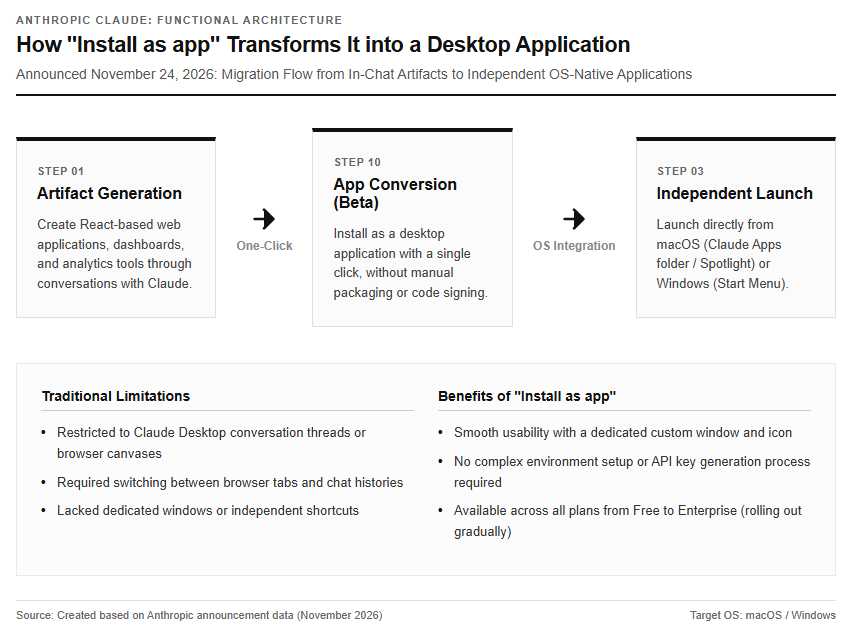
As a system requirement to use this feature, Claude Desktop version 6.28899.0 or later for Mac or Windows is required. Furthermore, although they operate as standalone apps, an internet connection and being logged into a Claude account are mandatory for startup and task execution; requests sent from the app will consume the usage limits of the user’s subscription plan.
Moving Beyond Web Browser Dependency: The Background of AI Tool Independence
Until now, mini-apps and visual tools created by generative AI often became buried deep within conversation histories, posing challenges for convenience when trying to use them repeatedly in daily workflows. Every time a user wanted to access a specific tool, they had to find the relevant chat session or open a bookmarked canvas. Anthropic’s “Install as app” represents a significant shift, elevating artifacts from mere byproducts of a conversation to “business applications used on a daily basis.”
In the daily operations of both corporations and individuals, there is a demand for the kind of usability offered by tools like calculators, Excel, or Slack—tools that reside on the screen and are quickly accessible. A mechanism where AI generates code in real-time to create dynamic tools and immediately deploys them into an OS-level standalone environment dramatically lowers the hurdle for non-engineers to develop their own business improvement tools (in-house DX).
Unlike existing PWA (Progressive Web App) shortcut technologies, this feature does more than simply display a web page within a frame; it enables deep integration with OS system functions. As a result, a new operational model is being established where AI-driven software integrates naturally with existing desktop ecosystems.
Permission Models and System Operation Mechanisms
Graduated OS Access Permissions and Security Controls
To balance security and convenience, apps converted to desktop via “Install as app” adopt a permission management model featuring three access permission levels (along with five granular individual permissions). The full scope of access permissions is as follows:
- Default Permissions: Operates in a protected environment equivalent to operations executable within a standard web browser.
- App Permissions: Can utilize OS functions such as sending desktop notifications, detecting global keyboard shortcuts, displaying windows always on top, and maintaining an icon in the menu bar (system tray on Windows).
- Full Computer Access: Possesses the authority to read, modify, and delete local files, as well as launch programs, without individual confirmations.
The following diagram illustrates the levels of access permissions requested by the app and their dialog structure.
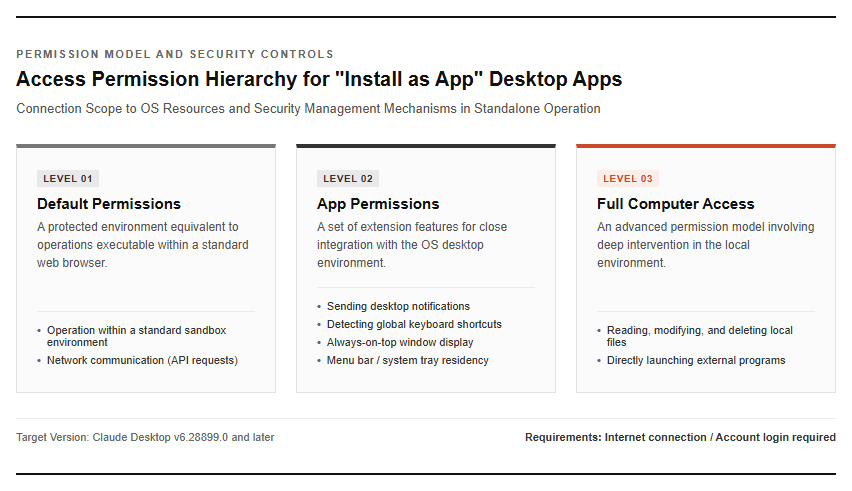
As a crucial security design, all permission grants are valid only for a specific version of the app. If the contents of the Artifact are updated or edited—even if the changes are made by the creator themselves—the access permission approval dialog will be displayed again. Furthermore, since Anthropic does not perform pre-screening, granting “Full computer access” to Artifacts created by third parties is restricted, with the specification limiting this permission to apps created by the user themselves or by members within the same organization.
Real-Time Synchronization Structure and Operating Environment Requirements
One of the major features of this functionality is the bidirectional real-time synchronization mechanism with the underlying Artifact. When a user or co-editor updates the Artifact code on Claude, the changes are automatically reflected on the app side already installed on the desktop. Unlike traditional methods of distributing locally compiled fixed binaries, central code management and app display on the device always match, which is expected to significantly reduce maintenance costs.
On the other hand, there are certain limitations and platform constraints for use as a standalone app. The installation feature is not available in Linux environments, web browser environments, or mobile devices. In addition, template-format Artifacts such as Claude Docs, Slides, and Sheets, as well as past legacy artifacts and Claude Cowork live artifacts, are excluded from being converted into apps.
Furthermore, this feature itself is set to unavailable in organizations with HIPAA-compliant configurations aimed at protecting medical information or hybrid deployment environments. It cannot be launched in an offline environment; upon startup, network connectivity and the login status to Claude are always verified.
Management Functions and Future Outlook in Corporate Organizations
Organizational Governance Settings and MDM Integrated Management
To ensure the safe operation of this feature in corporate organizations, Anthropic provides centralized management functions in the management console (Organization settings > Artifacts). Depending on the organization’s subscription plan, the initial settings (default states) vary as follows:
- Team Plan: “Install as app” and “App permissions” are enabled by default, while only “Full computer access” is disabled by default.
- Enterprise Plan: Out of consideration for security risks, all three setting items are disabled by default and must be explicitly enabled by administrators with organization Owner privileges.
Furthermore, all settings are disabled by default when CMEK configurations, where the organization manages its encryption keys in-house, or ZDR (Zero Data Retention) configurations, where the organization does not retain data globally, are applied. It should also be noted that communication by installed desktop apps is not included in the data retention exclusion scope of ZDR.
When controlling corporate-owned devices, system-level control is possible using mobile device management (MDM) policies. Configuration keys such as isArtifactAppsEnabled, isArtifactAppPermissionsEnabled, and isArtifactAppFullAccessEnabled are provided, allowing mass disabling via the registry under Windows (HKLM\SOFTWARE\Policies\Claude) and through configuration profiles on macOS. MDM restrictions take precedence over organization settings, and setting changes are reflected on devices in approximately 5 minutes.
Audit Log Specification Challenges and Future Prospects of AI App Building
As a challenge that corporate IT departments should understand when considering adoption, there are limitations regarding the tracking scope of audit logs (Compliance API). Under the current specifications, what is recorded in the Compliance API is limited to “operations opening the app” and “confirmation of access permissions,” which are logged as normal Artifact viewing events. On the other hand, “execution of app installation,” “permission allow/deny decisions,” “on-device operations such as reading and writing local files,” and “setting changes by administrators” are not recorded in the API logs themselves.
This specification, where details of local file operations and program execution are not left in logs, is an important point to keep in mind during root cause investigations and governance audits when security incidents occur. In future roadmaps, enhancements to re-approval workflows when loading third-party external code and the expansion of detailed audit logging capabilities are anticipated.
With the introduction of “Install as app,” an environment has been established where even users without programming knowledge can build and operate custom desktop tools for their own company in a short time through conversation. This can be said to be a major step toward a future where AI not only generates code but also integrally provides execution environments and interfaces.
Reference Pages
- Anthropic Official Announcement: Turn artifacts into Mac and Windows apps
- Claude Help Center: Install an artifact as an app
- Claude Help Center: Artifacts admin guide for Team and Enterprise plans
[#Anthropic #Claude #Artifacts #DesktopApp #AITools #BusinessEfficiency #InHouseDX]
コメント