
Anthropic has announced “Routines,” an automated execution feature for Claude Code. This marks a shift away from traditional local terminal dependency, enabling autonomous development tasks to be executed periodically and event-driven in the cloud.
- Overview of Background Automated Execution on Cloud Infrastructure
- Three Trigger Structures to Enhance Development Efficiency
- Examples of Automated Code Review and Backlog Organization
- Monitoring Alerts and Integration Flow with External Systems
- Available Plans, Execution Limits, and Security Design
- Outlook on the Development Workflow in the Era of Autonomous AI Agents
Overview of Background Automated Execution on Cloud Infrastructure
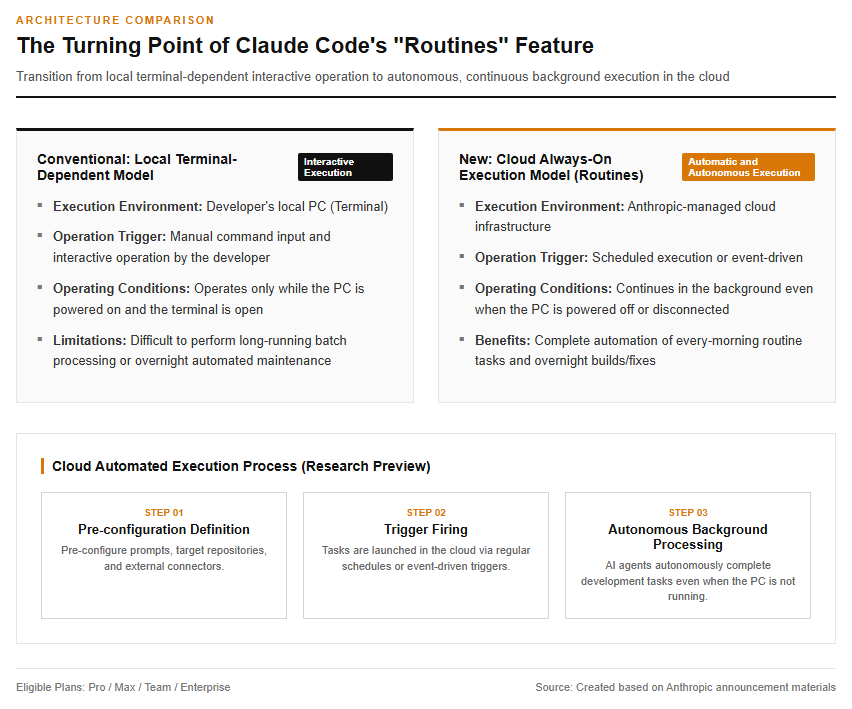
On April 14, 2026, Anthropic released “Routines,” a new feature for the developer coding tool Claude Code, as a research preview. This feature is available to users on paid plans such as Pro, Max, Team, and Enterprise. Previously, Claude Code required developers to open a terminal, enter commands, and operate it interactively. However, with the introduction of the Routines feature, by pre-defining configuration information for prompts, repositories, and connectors, tasks are automatically executed on cloud infrastructure managed by Anthropic. The standout feature is that even when developers turn off their PCs and close their laptops, the AI agent in the cloud continues working in the background. This allows routine morning tasks and nighttime maintenance operations to be completed without human intervention. The diagram below illustrates the automated execution process in the cloud.
Three Trigger Structures to Enhance Development Efficiency
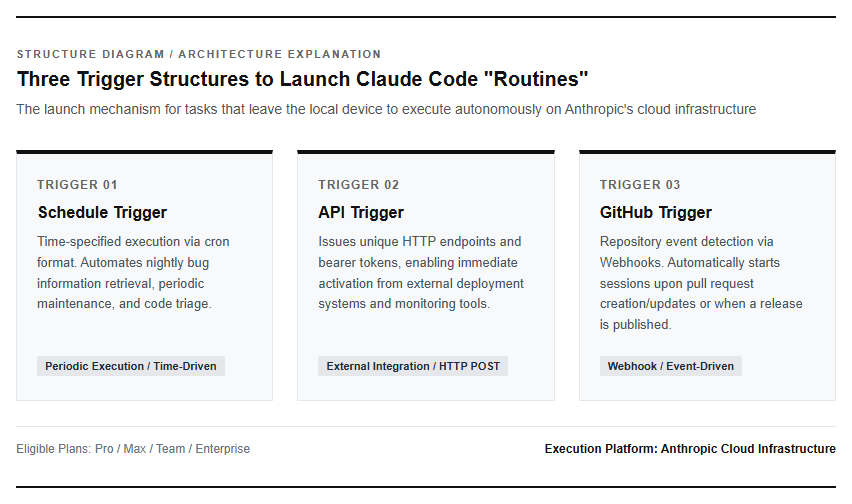
At the core of the Routines feature are three types of trigger mechanisms that initiate tasks. The first is the “Schedule Trigger,” which allows you to specify periodic executions at a specific time every day or on fixed days of the week. For example, cron-like tasks such as “fetch bug information every night at 2 AM and create a fix draft” can be configured. The second is the “API Trigger,” which issues a unique HTTP endpoint and bearer token for each routine. By sending an HTTP POST request from an external deployment system or monitoring tool, a session can be launched immediately. The third is the “GitHub Trigger (Webhook),” which detects repository events such as the creation or update of pull requests and the issuance of releases to automatically boot up. These triggers can also be combined and configured within a single routine, providing the flexibility to meet the diverse needs of development sites.
Specific Examples and Mechanisms of Development Automation Brought by Routines
Examples of Automated Code Review and Backlog Organization
In actual development environments, the Routines feature significantly reduces the burden of code review and issue management. In a use case utilizing the GitHub trigger, when a new pull request is created, the AI automatically analyzes the code diff. It can detect security warnings, violations of naming conventions, or a lack of test code, and automatically post comments before a human reviewer checks them. Additionally, filter conditions can be built to generate summaries and notify a dedicated chat channel only when changes are made to specific modules. Furthermore, operations are being implemented where a schedule trigger is used to triage unprocessed issues overnight, automatically assigning appropriate labels and assignees and generating progress reports. The image below represents the automated PR review flow.
Monitoring Alerts and Integration Flow with External Systems
By utilizing the API trigger, the automation of incident response and deployment verification is realized. For example, when monitoring tools such as Datadog or Sentry detect an anomaly alert in the production environment, they can automatically launch a Claude Code routine via an API request. The AI receives the sent stack trace and log information, cross-references the corresponding source code repository, and performs root cause analysis. Advanced integrations are possible, such as preparing a draft pull request with fixed code before engineers even begin their primary response. Moreover, cross-platform synchronization mechanisms have been put into practical use, where code changes are automatically ported to an SDK repository in another language and a PR is created when code is merged in one language’s SDK repository.
Operational Requirements for Implementation and Future Points of Focus
Available Plans, Execution Limits, and Security Design
Using the routines feature requires a paid Claude Code plan (Pro, Max, Ultra, Team, or Enterprise) and web access rights. Execution counts and resource consumption are subject to per-account and per-task hourly limits, designed to prevent unlimited resource consumption. Strict security considerations have also been implemented. By default, the push destination for code generated by AI through routines is restricted to a dedicated branch prefixed with “claude/”. This prevents unintended direct overwrites of the main branch and the introduction of erroneous code, ensuring a safe operational process that always involves human review.
Outlook on the Development Workflow in the Era of Autonomous AI Agents
The announcement of Claude Code’s routines feature symbolizes the evolution of AI coding assistance from an “interactive tool” to an “autonomously operating digital colleague.” Previously, AI only responded when a developer turned on their PC and entered a prompt, but the advent of routines establishes an environment that operates in the cloud 24 hours a day. Moving forward, expanded integration with Git hosting services other than GitHub and various SaaS tools is expected. Rather than mere code completion, a style where AI constantly monitors, proposes improvements, and automatically fixes issues in the background of the development cycle is likely to become standardized. An era is arriving where developers will be freed from routine tasks and can concentrate on more essential architectural design and value creation.
Reference Pages
- [Introducing routines in Claude Code – Anthropic Official Blog]https://claude.com/blog/introducing-routines-in-claude-code
- [Automate work with scheduled tasks – Claude Code Docs]https://code.claude.com/docs/en/routines
[#ClaudeCode #AutomatedExecution #Anthropic #RoutinesFeature #AIAgent #GitHubIntegration]


コメント