On November 24, 2026, Google announced the general availability of the “Workspace MCP Server” and “Workspace CLI,” dedicated connection foundations that allow AI agents to operate various data sources such as Gmail and Google Drive, and announced that the use of MCP will become mandatory for future integrations. This decision stems from the technical and operational limitations of the traditional REST API model—which relied solely on authentication tokens—in fully ensuring the security of autonomously operating AI agents.
- Overview of the Official Release and the Decision to Mandate MCP
- The Collapse of the Traditional REST API Premise and the Background to Unifying AI Connections
- Pre-Approval Workflows Involving Human Verification and Automated DLP Enforcement
- New Additional Terms Governing OAuth Identification and Data Retention Limits
- Multi-layer Defense Architecture Using Cloud Agent Gateway
- February 2027 MCP Mandate and April Pricing Tiers
- Integration Inventory and Migration Steps IT Administrators Should Take Right Now
Overview of the Official Release and the Decision to Mandate MCP
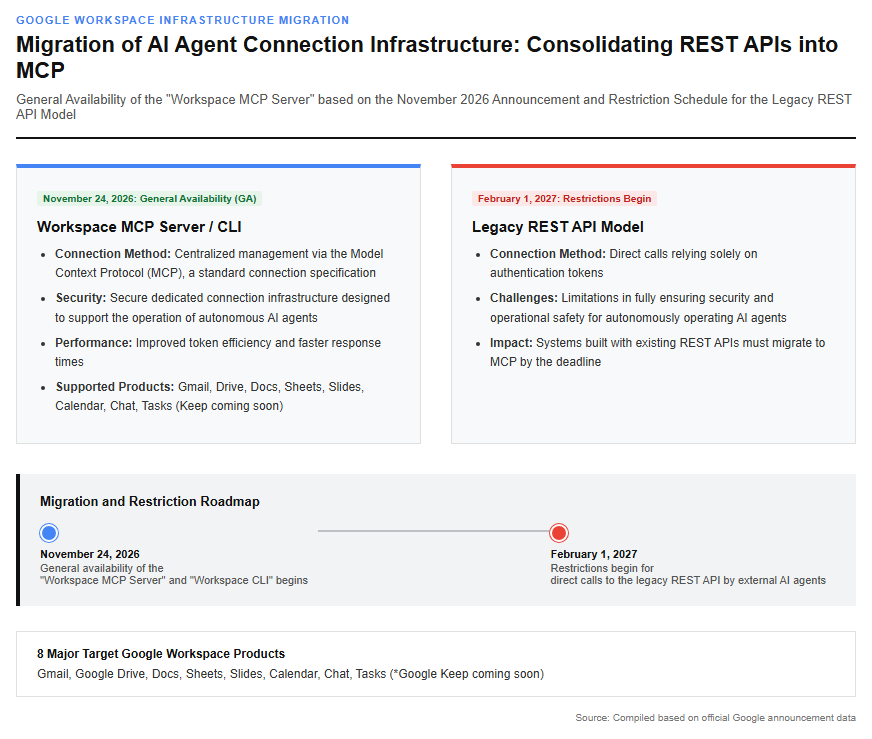
On November 24, 2026, Google launched the general availability (GA) of the fully managed “Workspace MCP Server” and the terminal-optimized “Workspace CLI” as official means to securely connect AI agents with Google Workspace. The supported services comprise eight major products: Gmail, Google Drive, Docs, Sheets, Slides, Calendar, Chat, and Tasks, with support for Google Keep scheduled in the near future. MCP (Model Context Protocol) is a standard connection protocol linking AI with external tools, delivering improved token efficiency and faster response times compared to traditional REST API calls.
Alongside this, Google clarified its policy making the use of MCP mandatory as the connection method for external AI agents accessing Workspace data. Technical access restrictions on direct calls to traditional REST APIs by autonomous AI will begin on February 1, 2027. Consequently, AI integration systems built on existing REST APIs will need to be migrated by this deadline. As shown in the architecture in the figure below, the system will transition to centralized management via a dedicated connection path.
The Collapse of the Traditional REST API Premise and the Background to Unifying AI Connections
REST APIs, which have been widely used in traditional application development, were designed on the premise that if a valid OAuth authentication token exists, the “request is considered to be executed by the user’s explicit intent.” However, in environments where AI agents make autonomous decisions on behalf of users and dynamically execute processing across multiple cloud services and tools, traditional authentication models alone have become insufficient.
Risks have been pointed out where AI could trigger unintended data modifications or unauthorized information sharing due to misinterpretations or indirect prompt injection attacks. To address these security concerns, Google has adopted a design that directly incorporates organizational permission settings, Data Loss Prevention (DLP) rules, and Human-in-the-Loop (HITL) pre-approval mechanisms directly into the communication path itself through which requests pass. This makes it possible to build a unified security boundary across the entire platform without relying on individual developer implementations.
Security Features and Administrative Control Mechanisms
Pre-Approval Workflows Involving Human Verification and Automated DLP Enforcement
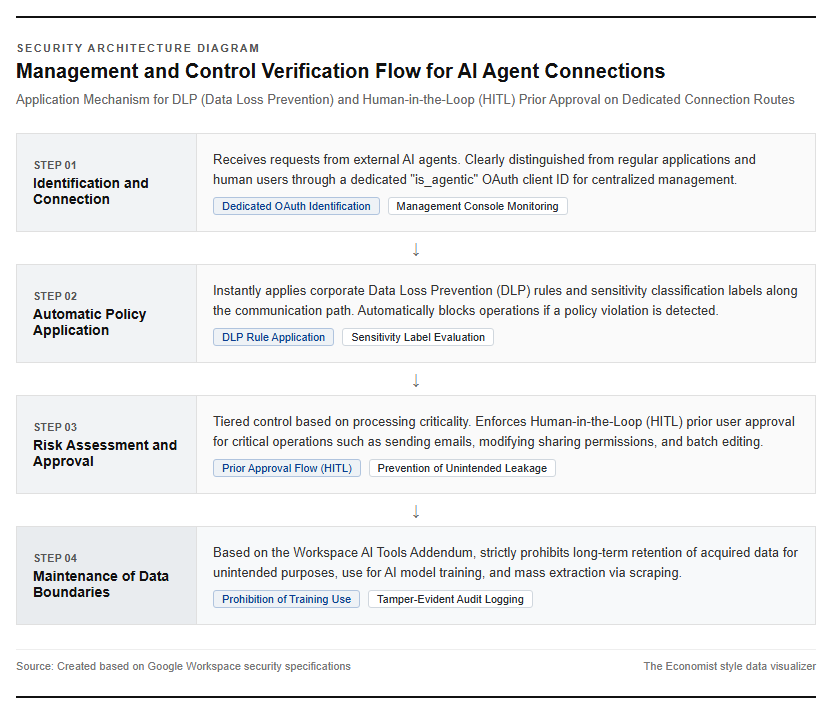
Under the new foundation, security levels are controlled in stages depending on the nature of the process the AI agent attempts to execute. For routine, low-risk tasks such as drafting emails or summarizing documents, the AI can proceed with processing automatically. On the other hand, when executing any of the following operations that have a significant impact on organizations or users, a Human-in-the-Loop (HITL) pre-approval workflow is enforced, requiring explicit confirmation of the details and execution permission from the user.
- Sending emails outside the organization via Gmail
- Modifying sharing permissions for files or folders in Google Drive
- Bulk editing or deletion operations on stored data
The pre-approval screen displays details such as the destination or sharing target to prevent the unintended external leakage of data. Furthermore, existing Data Loss Prevention (DLP) rules and confidentiality classification labels set by enterprises are automatically applied, and if a policy violation is detected, the operation is blocked preemptively. All agent operations and user approval histories are recorded in the admin console’s audit logs in a tamper-evident format.
New Additional Terms Governing OAuth Identification and Data Retention Limits
To achieve enhanced transparency and secure management in enterprises, Google has mandated that external AI agents use dedicated OAuth client IDs that are clearly distinguished from traditional applications and human users. By selecting “Client for AI-powered agents (is_agentic)” during OAuth configuration in the Google Cloud Console, administrators can centrally list, monitor, and audit connected agents from the admin console and instantly revoke access permissions as needed.
Furthermore, a new operational policy, the “Workspace AI Tools Addendum,” has been published. This addendum explicitly prohibits authorized external AI tools from retaining data retrieved from the Google Workspace APIs for unauthorized long-term periods, using retrieved data to train or fine-tune their own AI models, and extracting large amounts of data through scraping techniques. As shown in the system architecture diagram below, strict data boundaries are maintained.
Multi-layer Defense Architecture Using Cloud Agent Gateway
As a security enhancement measure at the infrastructure level, Google Cloud provides a relay and control infrastructure called the “Agent Gateway.” The Agent Gateway securely relays communications between AI models, MCP servers, and agent-to-agent (A2A) interactions, verifies the identity of registered agents, and then applies Identity and Access Management (IAM) policies.
For basic communication behavior, a zero-trust model of “default deny for outbound communication” is adopted. Additionally, incoming data undergoes real-time inspection by “Model Armor,” a dedicated security feature that defends against prompt injection attacks. It is possible to configure strict access control rules that mandate multi-factor authentication (MFA) or administrator approval before high-risk operations, such as reading highly confidential cloud storage, changing permissions, or updating production environment settings.
Two Deadlines in 2027 and Actions Enterprises Should Take
February 2027 MCP Mandate and April Pricing Tiers
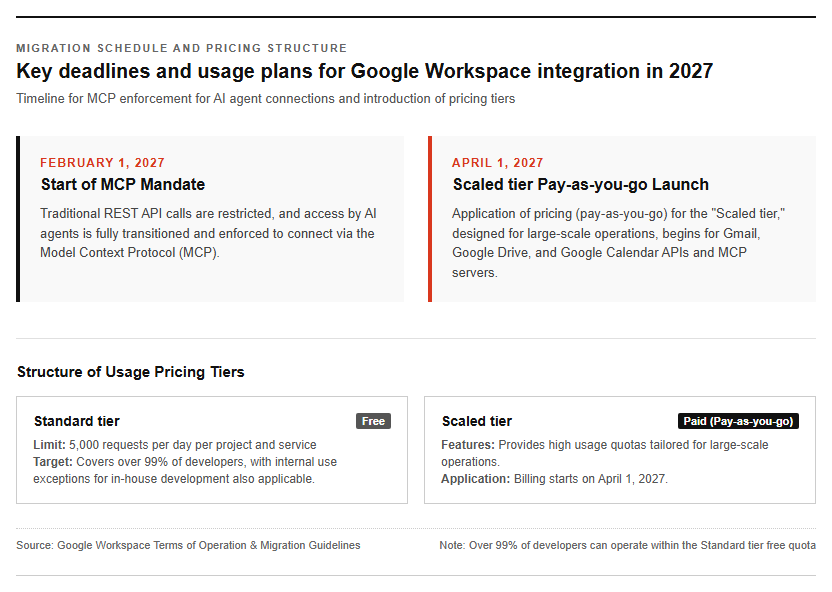
Google has established a phased schedule and a clear pricing structure for this infrastructure migration. The integration tiers are standardized into two types: the free “Standard tier” and the “Scaled tier” intended for large-scale operations with high usage quotas. It is estimated that over 99% of currently active developers can operate without issues within the free allowance of the Standard tier. The two main deadlines regarding the migration are as follows:
- February 1, 2027: For access by AI agents, traditional REST API calls will be restricted, and connections via MCP will be technically enforced to begin.
- April 1, 2027: Metered billing for the Scaled tier will begin for Gmail, Google Drive, and Google Calendar APIs as well as MCP servers.
The free tier quota for MCP in the Standard tier is set at 5,000 requests per day per project and per service. Additionally, for in-house development projects used exclusively internally, a special exception is provided where administrators can register them for internal use to maintain higher limits without incurring additional costs.
Integration Inventory and Migration Steps IT Administrators Should Take Right Now
With the connection switchover deadline in 2027 approaching, IT administrators at enterprises operating Google Workspace are strongly advised to begin preparations promptly. Leaving AI tools or custom-developed automation scripts deployed within the organization uncataloged raises concerns that existing business processes may suddenly stop when technical restrictions begin in February 2027. They are required to proceed with phased responses along the steps below.
- List and conduct an inventory of AI agents and related integration services currently in use within the company.
- Check the status and schedule of migration support to MCP connections with external service providers and in-house development departments.
- Organize the boundaries for business operations that require prior approval, such as sending emails or sharing files.
- Establish OAuth client identification and audit log output systems in the Admin console’s “Security > API Controls.”
While checking the response status of vendors providing external AI tools, building a security operation system that complies with data retention policies will be the most critical challenge for future corporate DX.
Reference Page
- [Google Workspace Updates: Workspace MCP servers and CLI general availability] https://workspaceupdates.googleblog.com/2026/11/mcp-servers-cli-standardized-usage-tiers-now-available.html
- Google Workspace Developer Guide: Configure Workspace MCP servers
- Google Workspace Developer Guide: Workspace CLI
- Google Workspace Terms: Workspace AI Tools Addendum
- Google Cloud Blog: Deploying agents safely in your enterprise
[#GoogleWorkspace #MCP #AIAgents #CloudSecurity #ITGovernance]
コメント