」_en.png)
Microsoft has introduced a new feature called LLP (Low Latency Profile) that dramatically improves response speed in Windows 11. The goal is to resolve the long-standing system lag and achieve a smooth operation experience comparable to competing OSes.
- A mechanism that speeds up performance with instant CPU boosts
- A shocking 40% improvement in startup speed and 70% improvement in UI response
- “Apple is doing it too” — Microsoft’s vice president’s rebuttal
- Benefits of low-spec machines and compatibility with the latest hardware
- Verification results regarding effects on heat generation and battery consumption
- Future implementation schedule and outlook for Windows 11
A mechanism that speeds up performance with instant CPU boosts
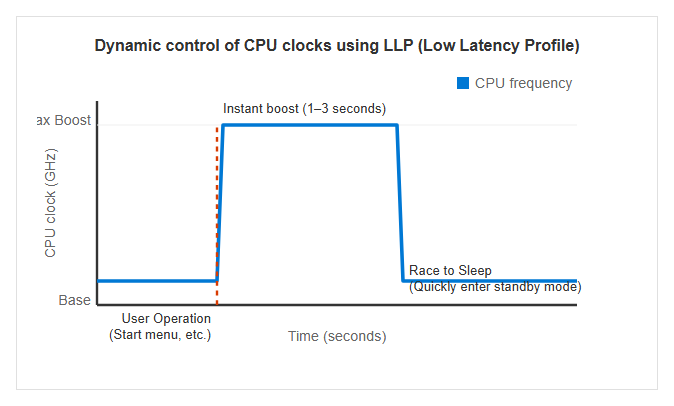
The “Low Latency Profile (LLP)” introduced in Windows 11 is a groundbreaking feature that temporarily maximizes CPU performance speed according to specific user operations. Specifically, high-priority tasks such as opening the Start menu, using Windows Search, operating the notification center (Action Center), or launching applications trigger the event. The mechanism is that at the moment these operations are performed, the CPU clock is forcibly raised for a very short period—about 1 to 3 seconds—up to the processor’s maximum boost frequency.
This feature represents an approach that repurposes the maximum catalog performance that had been shelved on the OS side until now to improve responsiveness during everyday operations. In traditional Windows, it was rare to immediately push the CPU to maximum clock speed during short processing due to power saving and heat reduction, but LLP aims to eliminate the overall system “heaviness” by optimizing this dynamic frequency scaling behavior. The diagram below illustrates the CPU clock movement when LLP is active.
A shocking 40% improvement in startup speed and 70% improvement in UI response
The performance improvements brought by LLPs are also clearly reflected in the numbers. According to official Microsoft data and initial verification results, standard applications like Microsoft Edge and Outlook can reduce startup times by up to 40%. Even more impressive is the responsiveness of the user interface (UI), with the Start menu and context menus displayed by right-click increasing by up to 70%.
In actual testing, it demonstrated significant effectiveness even in low-spec virtual machine environments equipped with Intel Core i5-13420H, intentionally limited to 2 cores and 4GB of memory. In this environment, when launching Edge or Outlook, a “spike” was observed, causing CPU usage to jump instantly from 96% to 97%, demonstrating the behavior of almost instantaneous browser window opening. In this way, environments with less hardware capacity are designed to benefit more strongly from the instantaneous full boost provided by LLPs.
The industry-shaking ‘brute force’ controversy and a shift in design philosophy
“Apple is doing it too” — Microsoft’s vice president’s rebuttal
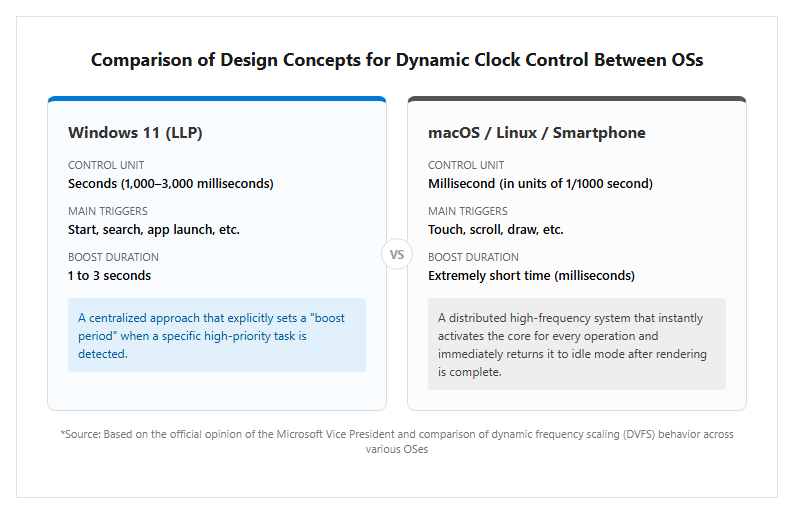
When criticism erupted from the community that LLPs are “not code optimization but merely a brute force to increase CPU speed,” on May 11, 2026, Microsoft Vice President Scott Hanselman officially issued a rebuttal. On social media (X), he claimed, “Apple is doing the same thing, and everyone loves it,” explaining that the method of instantly booting cores and increasing clocks in sync with user touch is the industry standard for macOS, Linux, and even smartphone OSes equipped with Apple Silicon.
Hanselman emphasizes that this method is not a “cheating” but a rational approach in modern computer science. In response to criticism that the system is solved in hardware without optimizing the code, he stated, “Or do both,” clearly stating that system optimization and LLP boosting are being pursued in parallel. This statement sparked significant debate among users seeking the lightness of the Windows 95 and XP eras. The diagram below shows the differences in clock control concepts between operating systems.
Benefits of low-spec machines and compatibility with the latest hardware
LLPs operate on a wide range of hardware, but the form of benefits varies depending on the PC’s specifications. The most dramatic changes are experienced in laptops ranging from mid-range to low-end and devices equipped with CPUs from a few years ago. In these environments, the CPU’s base clock is often kept low, so instantaneous boost by LLP is the decisive factor in eliminating operational ‘stickiness.’
On the other hand, even in environments equipped with the latest high-end CPUs, LLPs are not meaningless. For example, processors with large caches like the AMD Ryzen 7 9800X3D, or the latest architectures like the Intel Core Ultra 9 285K, which combine P-cores and E-cores, enable LLPs to coordinate core allocation control to achieve more refined responsiveness. For gamers, the direct increase in FPS (frame rate per second) during gameplay is limited, but it is expected to shorten game startup times, reduce “wait times” during multitasking, such as Discord notifications during gameplay and Steam overlay displays.
Safety in practical applications and future developments
Verification results regarding effects on heat generation and battery consumption
There are also many concerns about heat generation, reduced battery life, and the impact on device lifespan caused by running the CPU at maximum clock speed. In response, detailed verification was conducted in an environment using the cumulative update program “KB5094126,” which was distributed in June 2026. As a result, the LLP’s clock increase was limited to an extremely short time of 1 to 3 seconds, so no significant changes in CPU average load or temperature were observed, nor was the concern of increased battery consumption supported.
Rather, this feature is based on the design philosophy of “Race to Sleep.” This idea is that by completing processing quickly and quickly, the CPU can return to a power-saving state more quickly, which reduces total power consumption compared to prolonged processing at low clock speeds. However, for users who set overclocks individually, it is pointed out that LLP can increase the frequency of high-load states, potentially affecting lifespan, so caution is necessary.
Future implementation schedule and outlook for Windows 11
LLP was first officially confirmed to be implemented as a “KB5089573” in Windows Insider Preview on May 15, 2026. Subsequently, on May 27, a preview update was released for the standard Windows 11 version, and through the regular cumulative update “KB5094126” in June 2026, it will be automatically enabled by all general users. Users do not need to perform any special operations; simply keeping Windows Update up to date allows them to benefit from this acceleration feature.
Microsoft is currently continuing a large-scale initiative called “Windows K2,” aiming for further performance improvements. LLPs are only the first step, and in the future, they are considering expanding LLP applications to third-party apps and implementing more advanced resource management features using AI. The long-standing challenges of improving the reliability and responsiveness of Windows 11 will reach a major turning point throughout 2026.
[#Windows11 #Microsoft #LLP #CPU #低遅延プロファイル #テクノロジー #自作PC]


コメント