On June 29, 2026, Microsoft began a public preview of “WSL containers,” which natively enables Linux containers to run on Windows. The reason containers can be built as a standard feature of Windows Subsystem for Linux (WSL) without relying on third-party tools is to simplify the development environment and strengthen enterprise management functions.
- Steps to start and implement the public preview
- Breaking Free from Dependence on Docker Desktop and the Development Background
- New CLI “wslc.exe” and Compatibility with Docker
- Advanced security isolation with individual virtual machines
- Improved file system and network performance
- Standardization of GPU Pass-Through Supporting AI Development
- Strengthening control and governance for administrators
- Outlook for the official release in fall 2026
- Transformation of the Container Ecosystem and Future Focus
Steps to start and implement the public preview
Microsoft first unveiled “WSL containers” (also known as WSLC) at its annual conference “Build 2026” on June 2, 2026, and publicly previewed it as a public preview on June 29. This new feature allows you to build, run, and manage Linux containers directly on Windows, without installing external applications like Docker Desktop. To use it, you need the latest prerelease version of WSL, which can be installed by running the update command “wsl –update –pre-release” in the terminal or by downloading the installer directly from GitHub. Once installation is complete, you will have access to the command-line tool “wslc.exe” for container operations and APIs for controlling containers from the program. Developers can significantly shorten the additional setup steps previously required to build container environments, enabling them to leverage container technology within Windows’ standard update cycle.
Breaking Free from Dependence on Docker Desktop and the Development Background
The introduction of WSL containers this time clearly aims to eliminate the long-standing dependence on third-party tools that Windows developers have faced. Until now, running Linux containers on Windows required external tools like Docker Desktop or Podman Desktop, which faced challenges such as setup overhead, license costs, and difficulties managing within the company. In large enterprises with many employees, paid Docker Desktop licenses have sometimes become a costly burden, but since WSL containers are provided as part of WSL, it may be possible to use them without considering additional license fees. Microsoft also recognizes that companies are concerned about Linux images running outside its own control, and by offering containers as a standard Windows feature, it aims to provide an “enterprise-ready” environment where IT departments can fully visualize and manage their runtime environments.
Technical specifications and new features for developers
New CLI “wslc.exe” and Compatibility with Docker
At the heart of WSL containers is the command-line interface (CLI) tool “wslc.exe.” This tool is designed in a format similar to existing tools like Docker that developers use daily, and its major feature is that it can directly repurpose the “muscle memory” (the sensation of operations learned by the body) developed in Docker. For example, when running Ubuntu’s KDE desktop environment inside a container, you can use the “wslc run” command to specify flags such as exposing ports or setting environment variables (such as -p, -e, –name, etc.) in a format almost identical to Docker. Additionally, a built-in alias called “container.exe” is provided, allowing operations to be operated using the command name container, which can be used instead of WSLC. Furthermore, for developers, APIs are provided to operate containers from C++, C#, and other sources via the NuGet package, allowing direct integration of container build and deployment procedures into build tools like MSBuild and CMake.
Advanced security isolation with individual virtual machines
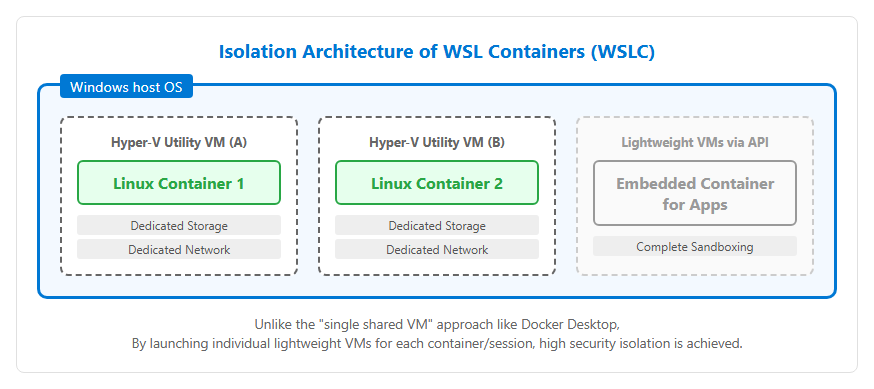
The internal architecture of WSL containers adopts a different approach from traditional WSL 2 and Docker Desktop. While Docker Desktop manages multiple containers on a single shared virtual machine (VM) by default, WSL containers generate individual, lightweight Hyper-V utility VMs in the background for each application or CLI session and run the containers. This strongly isolates storage and networks between containers, minimizing the risk of one containerized app peeking into another app’s container. As shown in the diagram below, each container does not have its own kernel area, but since it operates as a separate VM managed by Windows, it functions as a more secure sandbox environment.
Please refer to the diagram below.
Improved file system and network performance
With the release of WSL containers, Microsoft has made significant improvements to the underlying technology. For the file system, “virtiofs” was newly adopted as the default. As a result, the transfer speed when accessing files inside the Linux container from Windows is up to twice as fast compared to the traditional method. On the network side, a new experimental network mode called “consomme” was introduced. This is designed to solve compatibility issues in complex environments such as corporate VPN and proxy configurations, relaying Linux network traffic via Windows, allowing users to benefit from the same network policies and security integration as Windows apps. These improvements aim to eliminate bottlenecks in mission-critical development, and in the future, they are being considered not only for container environments but also for WSL distributions across the board.
Practicality and significance for corporate adoption
Standardization of GPU Pass-Through Supporting AI Development
To accommodate the recent increase in AI and machine learning workloads, WSL containers come standard with GPU-assisted features. It adopts a GPU passthrough method based on the Container Device Interface (CDI), allowing users to directly access the host’s graphics card resources from within the container simply by adding the “–gpus all” flag when the container starts. Notably, while Docker on Windows limited acceleration to Nvidia GPUs, WSL containers have no architectural limitations and are designed to support a wide range of backends from Intel, AMD, and even Arm-based chipsets. This enables developers running workloads like PyTorch to perform fast machine learning training and inference accelerated on Windows standard environments, without being tied to any specific hardware vendor.
Strengthening control and governance for administrators
WSL containers are packed with features to help corporate IT departments securely manage their development environments. It integrates with Microsoft Defender for Endpoint and has been updated to monitor and detect security events within Linux containers. It also supports detailed configuration management using Intune and group policies (GPO/ADMX). Administrators can control WSL distributions and container usage within the organization, and can also configure an “Allowlist” to ensure images can only be retrieved from trusted container registries. This breaks the traditional opaque situation where developers run rogue containers without permission, enabling developers to provide the latest tools while meeting corporate compliance requirements.
Future Developments and Highlights
Outlook for the official release in fall 2026
Microsoft aims to officially release this WSL containers feature (public availability: GA) in fall 2026. Currently, it is in the public preview stage, with features being revised and added based on feedback. The biggest current limitation is that support for “Docker Compose,” which manages and runs multiple containers in bulk, was not initially provided. Microsoft recognizes the need for this feature and is considering adding it in future updates, but for now, its primary use will be running a single container. Additionally, the VS Code Dev Containers extension can be supported by changing the Docker path to “wslc” in the settings, and integration with surrounding ecosystems is progressing rapidly.
Transformation of the Container Ecosystem and Future Focus
The emergence of WSL containers holds the potential to fundamentally change the development environment for Windows. As standard OS features begin to replace the role Docker Desktop has traditionally played, developers will be forced to choose between using Docker or WSLC. However, Microsoft does not deny coexistence with Docker Desktop or Podman Desktop, stating that these existing tools also benefit from improvements in WSL’s foundational technologies, such as virtiofs and faster memory recovery features. Going forward, it is expected that existing tools will be used when multifunctional GUIs or Kubernetes integration are needed, while WSL containers will be used when lightweight and highly isolated execution environments are needed.
[#WSL #コンテナ #Windows11 #Docker #AI開発 #マイクロソフト #技術ニュース #wslc]


コメント