
On June 29, 2026, Microsoft’s security research team announced that they had discovered a malicious Chrome extension disguised as the AI search engine ‘Perplexity,’ which secretly steals users’ input. This attack is a sophisticated social engineering tactic that exploits highly trusted AI brands, exploiting a combination of legitimate browser privileges.
- The true identity of “Search for perplexity AI” impersonating a popular AI brand
- Real-time data theft mechanism that records every key input
- Abuse of ‘legitimate authority’ to evade review
- Accelerating trends in “AI-baited” social engineering
- The fear of ‘sleeper agents’ where trust is weaponized
- Steps to Clean Up a Compromised Browser and Minimize Damage
- Strengthening corporate governance and the future of browser security
The true identity of “Search for perplexity AI” impersonating a popular AI brand
On June 29, 2026, Microsoft’s Defender security research team revealed that an extension called “Search for perplexity ai,” distributed on the Google Chrome Web Store, was conducting highly malicious surveillance activities. This extension pretended to be the official tool of the rapidly growing AI search service “Perplexity,” deceiving many users into installing it.
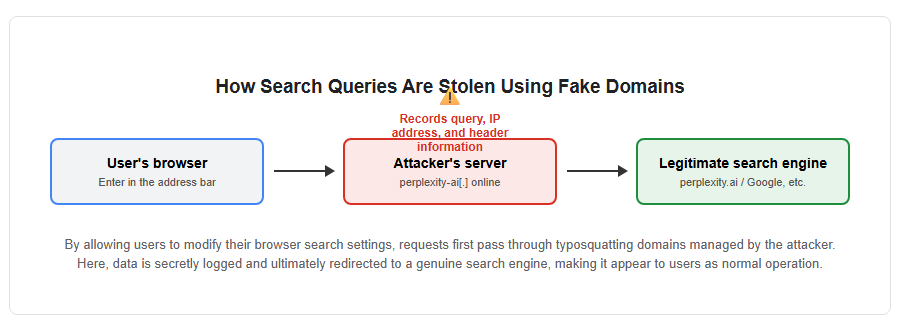
Its biggest feature is the “perplexity-ai[.]” domain, which closely resembles the real domain “perplexity.ai.” The reason is that they used the typosquatting domain called ‘online.’ When users install this extension, the browser’s default search engine will be rewritten to this fake domain.
According to Microsoft’s analysis, this extension was designed with meticulous care to avoid users’ notice, going beyond merely hijacking searches. Specifically, after recording search queries via servers controlled by attackers, they immediately redirected them to legitimate search engines such as Google, Bing, or the genuine Perplexity. Because this sequence of actions was performed in an extremely short time, users could receive the expected search results as usual, and it was difficult for them to realize their data had been stolen.
The diagram below shows the process by which attackers use fake domains to lure users.
Real-time data theft mechanism that records every key input
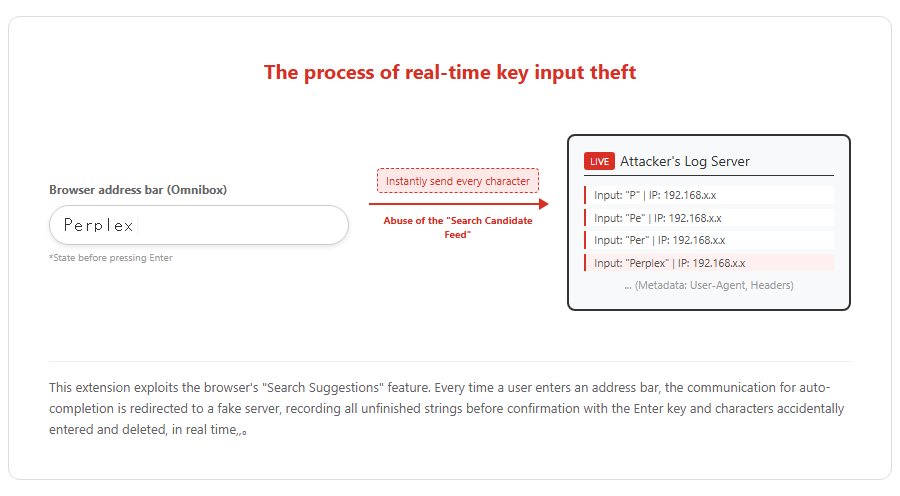
The reason this extension is particularly serious is that it steals characters entered by users in the address bar (omnibox) in real time, even before they could confirm (press Enter). This behavior was achieved by exploiting access to the “Search Suggestions” feed that Chrome uses to display predictions.
According to a report from Microsoft’s Defender security research team, every time a user entered a single character, that data was instantly sent to a server managed by the attacker. Even if a user accidentally deletes characters or stops searching without pressing Enter, all previously entered strings are recorded.
The collected data included not only the input strings themselves but also users’ IP addresses, browser header information, and user agent strings. This allowed attackers to profile individual users in detail, enabling them to use this for targeted attacks, the collection of confidential information, and exploitation of ad delivery. The diagram below shows the flow of data sent to the server as the characters being typed.
Abuse of ‘legitimate authority’ to evade review
The malicious extension that bypassed the Google Chrome Web Store’s review process and was released was the result of a clever tactic that exploited a combination of two legitimate permissions provided by the browser. The abuses involved the “chrome_settings_overrides” to override search engine settings and the “declarativeNetRequest (DNR)” permissions for managing network requests.
“declarativeNetRequest” is originally designed to efficiently and securely control communications for purposes such as ad blocking, and since it operates on a rule-based basis, it is less likely to be considered an issue during review. However, by combining this with permission to change the default search engine, it became possible to build a monitoring pipeline that records queries on their own servers and then redirects them to valid search results.
Furthermore, it has been pointed out that this extension was designed to appear clean during application, and that the actual malicious logic may have adopted a mechanism that dynamically loads from a remote source. Microsoft has concluded that this design was not accidental but intended for deliberate monitoring. Following reports from Microsoft, Google removed this extension from its store by June 2026, but the period during which it was available or the number of installs before removal has not been disclosed.
Expanding AI brand misuse and supply chain threats
Accelerating trends in “AI-baited” social engineering
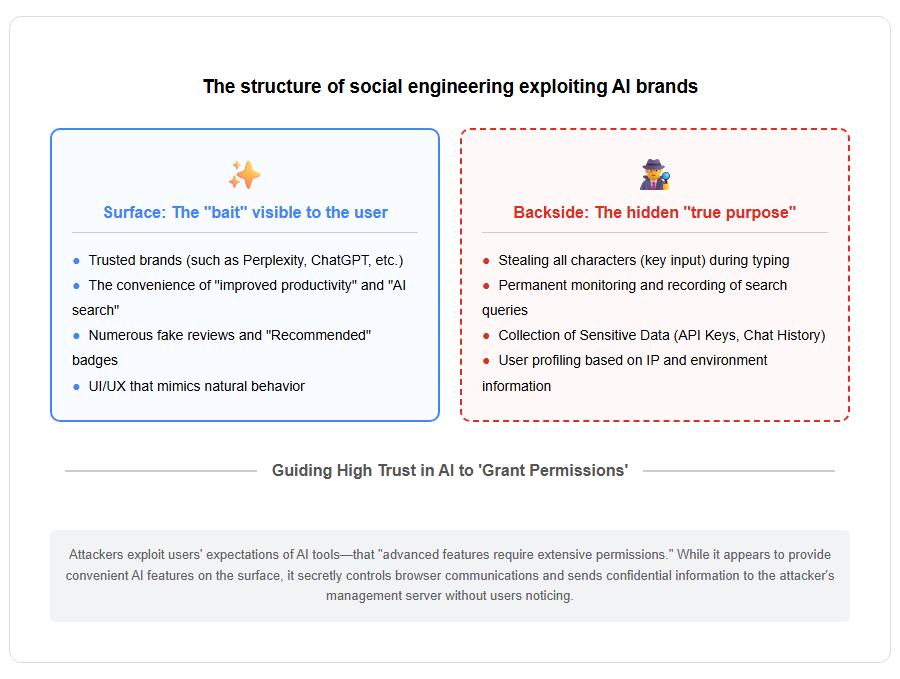
Microsoft’s research team warns that this incident is part of a broader trend of “AI-branded social engineering,” where cybercriminals exploit the rapid spread of AI and the high trust users have gained. As many companies and individuals rush to adopt generative AI tools, AI-related brand names have become highly attractive “shining bait” for attackers.
In their pursuit of convenience, users tend to easily grant broad access to websites for extensions claiming AI assistants or productivity tools. Attackers exploit this psychological vulnerability and focus more on driving users to install by leveraging their trust rather than technical attacks such as exploiting vulnerabilities.
In fact, similar campaigns have been confirmed multiple times in the past. For example, in the campaign called “AITOPIA,” which targeted chat histories of ChatGPT and DeepSeek, over 900,000 users were affected. Additionally, malicious extensions that eavesdrop on ChatGPT sessions or collect AI chat content for sale to data brokers have been discovered one after another between 2025 and 2026.
The diagram below illustrates the structure of attacks using trusted AI brands as a cover.
The fear of ‘sleeper agents’ where trust is weaponized
Another serious issue with browser extensions is supply-chain breaches, where tools that were initially safe can later become malicious through updates. Cybersecurity company Barracuda Networks calls this a “sleeper agent” and has warned about its dangers.
Many extensions automatically update in the background after installation, but users rarely see changes in permissions or code with each update. Attackers can simultaneously distribute malicious code to a user base built over months or years by buying rights from existing extension developers or hijacking development environments.
According to research by Stanford University and others, it takes an average of about 380 days for malicious extensions to be removed from official stores, during which time users remain vulnerable. Even trust metrics such as the official store’s “Recommended” badge, numerous positive reviews, and long publication periods no longer fully guarantee safety.
Defensive measures users should take and future outlook
Steps to Clean Up a Compromised Browser and Minimize Damage
Even if Google removes malicious extensions from official stores, those already installed in users’ browsers are not automatically removed. Therefore, users who remember adding “Search for perplexity ai” even once must immediately perform manual uninstallation procedures.
The first step is to type “chrome://extensions” in your browser’s address bar and carefully review the list of installed extensions. Since extensions may have duplicate names in Chrome, it is recommended to turn on developer mode and check the displayed “32-character unique ID,” then compare it with the correct ID listed on the developer’s official website.
Additionally, by checking the following points, you can further reduce risks.
-
Check Chrome’s “Settings > Search Engine” to check for things the default search provider did not intend, such as perplexity-ai[.], Online, etc.).
-
Remove all infrequently used extensions and minimize the attack surface.
-
Strictly determine whether the permissions requested by extensions are excessive for their functionality (e.g., whether a simple translation tool does not require monitoring of all website communications).
Strengthening corporate governance and the future of browser security
For business organizations, managing browser extensions is a major security blind spot. While many organizations have thorough software asset management, there are often cases where there is insufficient visibility into browser extensions that individual employees can freely install.
According to Gartner’s forecast, by 2029, 30% of companies will adopt secure enterprise browser technologies to enhance extension audits and risk profiling. Going forward, it will be essential to treat extensions not just as convenient personal tools, but as “third-party software” that allows access to confidential data, and to establish enterprise-level governance.
Specifically, effective methods include introducing allowlists (arrow lists) by administrators, building systems to monitor suspicious permission requests, and real-time threat detection using AI-powered XDR (Extended Detection and Response) solutions. As AI advances accelerate cyberattacks, how to protect browsers—the “gateway to business”—will be key to future digital security.
[#サイバーセキュリティ #GoogleChrome #生成AI #Perplexity #フィッシング #科学技術 #セキュリティ対策 #ブラウザ拡張機能]


コメント