On September 23, 2026, Google integrated a new feature into Google Docs that allows users to directly reference research data saved in Gemini Notebook to generate content. This update aims to eliminate tedious copy-and-paste workflows across tools and foster grounded knowledge utilization.
- Overview of the Update and Google Docs Integration
- Referencing Notebooks via “@” Mentions
- Eliminating Copy-Paste Overhead to Transform Workflows
- Mitigating Hallucinations Through Source Grounding
- Knowledge Reuse and Standardization Across Organizations
- Enterprise-Grade Permissions and Security Safeguards
- Adoption Challenges and Future Roadmap
Overview of the Update and Google Docs Integration
On September 23, 2026, Google announced a new integration for Google Workspace and Google AI subscribers, enabling the generative AI assistant Gemini within Google Docs to directly pull data from Gemini Notebook (formerly NotebookLM) as a primary reference source. Rebranded from NotebookLM on July 16, 2026, Gemini Notebook is widely used as an AI research tool that imports and synthesizes vast amounts of primary source material, including PDFs, audio recordings, and YouTube videos. Under traditional workflows, users had to copy and paste or drag and drop analyzed text from Gemini Notebook into Google Docs manually. With this feature expansion, writers can specify existing notebooks containing dozens or hundreds of saved documents directly as context without ever leaving the document editor, using them seamlessly to draft and refine text. This eliminates the friction between research and writing, dramatically accelerating document creation.
Referencing Notebooks via “@” Mentions
The user experience is designed to be straightforward and intuitive. In the Gemini side panel on the right side of Google Docs or in the Gemini prompt bar at the bottom of the screen, typing the “@” symbol brings up a pop-up list of previously created Gemini Notebooks. After selecting the desired notebook, users can enter prompts such as “Draft a project proposal” or “Summarize the technical specification.” The system then analyzes the source materials within the specified notebook and immediately generates the requested text. Please refer to the diagram below.
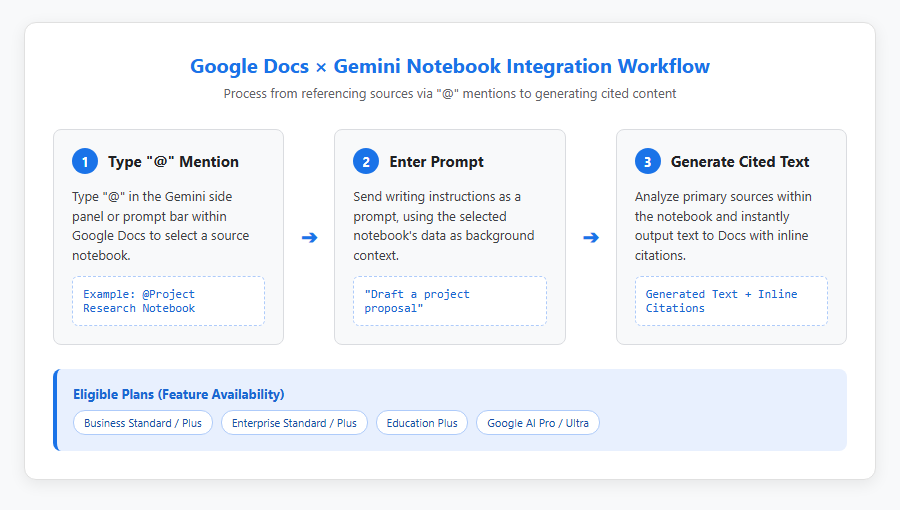
The generated text includes inline citations linking back to the exact source materials in the notebook, allowing writers to verify primary facts with a single click. The feature is available across a wide range of plans, including Google Workspace Business Standard, Business Plus, Enterprise Standard, Enterprise Plus, and Education Plus, as well as individual Google AI Pro and Google AI Ultra plans. Administrators must enable Gemini features in Drive, and users must have smart features turned on in their settings to start using the functionality immediately.
Eliminating Copy-Paste Overhead to Transform Workflows
In traditional business workflows, research and document drafting were split across disparate tools. For instance, if an analyst uploaded 50 PDF research papers or meeting transcriptions into Gemini Notebook to generate summaries, they had to open the results in a separate browser tab and manually copy and paste the text into Google Docs. Frequent context switching and manual transcription not only broke concentration but also increased the risk of copy-paste errors and lost context. This integration allows the entire knowledge workflow—research, analysis, and drafting—to take place within a single Google Docs interface. Furthermore, Gemini in Docs can combine information from specified Gemini Notebooks with other external sources across Google Workspace, such as Gmail messages, Google Drive files, and chat histories, enabling sophisticated document generation. As a result, the time required to draft complex documents like project proposals, research reports, and technical white papers is drastically reduced.
Technical Background and Advancements in Knowledge Management
Mitigating Hallucinations Through Source Grounding
One of the biggest challenges in deploying generative AI across enterprises is hallucination—when models generate plausible-sounding but factually incorrect information. Standard AI chat models produce answers based on probabilistic language patterns learned from vast internet datasets, making factual errors hard to avoid completely. In contrast, Gemini Notebook employs “source grounding” technology powered by Gemini 1.5 Pro’s massive context window of up to 2 million tokens. Please refer to the diagram below.
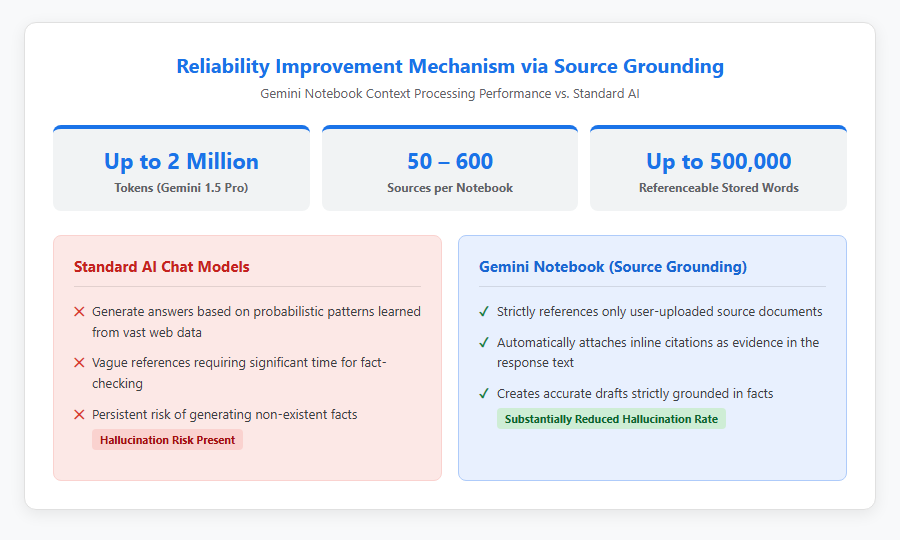
By grounding responses strictly in the user’s uploaded source documents—supporting between 50 and 600 sources per notebook (up to 500,000 words)—the system substantially lowers the probability of hallucination. This robust source grounding capability is preserved entirely within Google Docs. Because the AI-generated draft text automatically includes citations pointing directly to relevant passages in the notebook, reviewers can complete fast, reliable fact-checking simply by cross-referencing the cited sources.
Knowledge Reuse and Standardization Across Organizations
In many organizations, valuable assets like historical research reports, product specifications, customer feedback logs, and institutional knowledge remain trapped in departmental silos. Organizing this internal knowledge into Gemini Notebooks transforms it into reusable, shared enterprise assets. When drafting a new document in Google Docs, employees of any experience level or department can type “@” to pull high-quality historical data and validation results into their drafts immediately. For example, referencing past pricing models or technical validation notes while drafting a proposal prevents redundant effort and standardizes output quality across teams. A single notebook can ingest diverse formats—including Word documents, PDFs, spreadsheets, Google Docs, and YouTube videos—and automatically syncs with updated Google Drive files every few minutes, ensuring that writers always work with the most current information.
Security, Operations, and Future Outlook
Enterprise-Grade Permissions and Security Safeguards
As the scope of referencing internal documents from Google Docs expands, governance measures like data leak prevention and access control become critical. When using Gemini Notebook with a personal Google Account (@gmail.com), submitting feedback (such as thumbs-up or thumbs-down) may result in human reviewers at Google inspecting the interaction logs and uploaded files. Conversely, enterprise Google Workspace accounts (e.g., Business Standard, Enterprise Plus) benefit from enterprise-grade data protection. Prompts, uploaded source files, and generated text from enterprise users are never inspected by human reviewers—regardless of feedback—and are never used to train AI models. Access permissions adhere strictly to Google Workspace access controls, making it best practice to categorize sharing levels (Public, Restricted, Confidential) and enforce the principle of least privilege.
Adoption Challenges and Future Roadmap
Looking ahead, the integration between Google Docs and Gemini Notebook is poised to evolve from a simple writing assistant into a foundational engine for automated enterprise knowledge. However, current deployment challenges include learning curves around prompt engineering and UI behavior. For example, when attempting to refine text via the bottom Gemini bar referencing the same notebook, the system might generate a new document rather than updating the active one, requiring users to become familiar with nuanced UI mechanics. Moving forward, open integration protocols like the Model Context Protocol (MCP) are expected to drive seamless connectivity with third-party platforms and SaaS tools like Adobe, Airtable, and Linear. For enterprises, launching pilot programs within select departments to establish notebook permissions and human-in-the-loop review processes before a gradual full-scale rollout will be key to long-term success.
Reference Pages
-
[Ground AI prompts in Google Docs on existing sources from Gemini Notebook – Google Workspace Updates] https://workspaceupdates.googleblog.com/2026/09/ground-ai-prompts-in-google-docs-on-existing-sources-from-Gemini-Notebook.html
-
[NotebookLM is now Gemini Notebook – Google Blog] https://blog.google/innovation-and-ai/products/gemini-notebook/notebooklm-gemini-notebook/
-
[Gemini Notebook Help Center] https://support.google.com/gemininotebook/
[#GoogleDocs #GeminiNotebook #GenerativeAI #GoogleWorkspace #KnowledgeManagement #Productivity #GoogleGemini]
コメント