On June 24, 2026, Figma, a leading design platform, announced its native timeline animation feature called “Figma Motion.” This capability serves as a strategic move to accelerate the evolution from tools to platforms amid the rise of AI-driven automation in design processes.
- Figma Motion Announcement and Overview at Config 2026
- Keyframe editing and production support with AI agents
- Optimizing development collaboration and exporting code using Dev Mode
- The Market Paradox Woven by Accelerated Earnings and Stock Price Crashes
- Comparison with Adobe After Effects and Competitive Advantages
- Platform Strategy in the AI Era and the Defense of the “System of Record”
- Manifestation of Legal Risks and Future Highlights
Figma Motion Announcement and Overview at Config 2026
On June 24, 2026, at its annual conference Config 2026, Figma announced a new feature called “Figma Motion,” which allows direct animation creation on the canvas, and launched its open beta version on the same day. This feature is positioned as the fourth independent “Motion” mode, following the previous three modes: Design, Draw, and Dev. Its biggest feature is that you can create timeline-based animations on the same canvas as your design, without relying on external tools.
Until now, movement representation in Figma relied on “Smart Animate” to complement screen transitions and third-party plugins, and when more advanced timeline editing was needed, exporting to external software like Adobe After Effects was necessary. With the introduction of Figma Motion, designers can complete UI motions while closely coordinating components and variables within the same file.
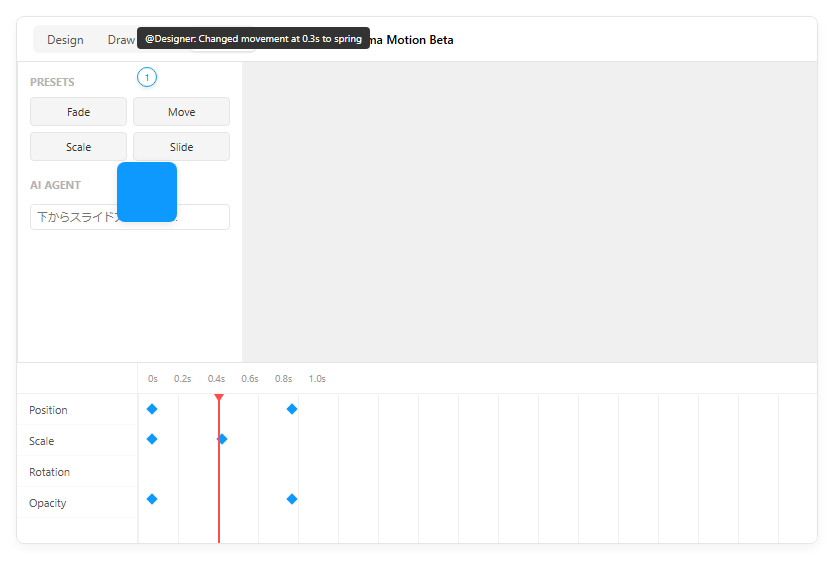
Furthermore, collaboration features have been enhanced, allowing users to leave specific comments for specific times on the timeline (such as the 0.3-second mark). This has enabled feedback on fine-tuning motion to evolve from abstract verbal exchanges to precise communication based on specific playback positions. The diagram below shows an example interface of the newly added Motion mode.
Keyframe editing and production support with AI agents
The technical core of Figma Motion lies in the flexibility to independently keyframe four basic properties: position, scale, rotation, and opacity. This allows for detailed control, such as changing only the opacity while keeping the position fixed. Additionally, you can visually adjust the easing curve and spring animation on the timeline, making it easy to intuitively create the UI’s tactile feel.
There are two major features that help improve production efficiency. One is the use of presets (animation styles) such as preset fades, moves, and scales. By using these as a starting point to create movement and later refining details with keyframes, production time can be significantly reduced.
The other is support through AI-powered “Figma Agents.” When users input natural language prompts such as “slide up and fade in from below,” AI automatically generates keyframes that serve as a foothold for movement. The generated animations are designed to be fine-tuned manually, serving as a powerful tool to support designers’ creativity. This AI feature is based on models from OpenAI, Anthropic, and Google, and is scheduled to be offered in a format where AI credits are consumed after the beta period ends.
Optimizing development collaboration and exporting code using Dev Mode
The true value of Figma Motion lies in the ability to directly translate the animation you create into the product implementation. In traditional workflows, developers would visually reproduce movements created by designers or implement Lottie files exported from After Effects, which caused a lot of friction. Figma Motion is fully integrated with “Dev Mode,” allowing developers to directly read each timing value and easing curve on the timeline as code.
In terms of specific output formats, in addition to CSS and JSON, it can generate valid code for the React framework. Especially for exports for React, code compatible with the widely used animation library “Motion” is output, allowing developers to accurately reproduce designers’ intent simply by copying and pasting. The diagram below shows an image of the code export screen in Dev Mode.
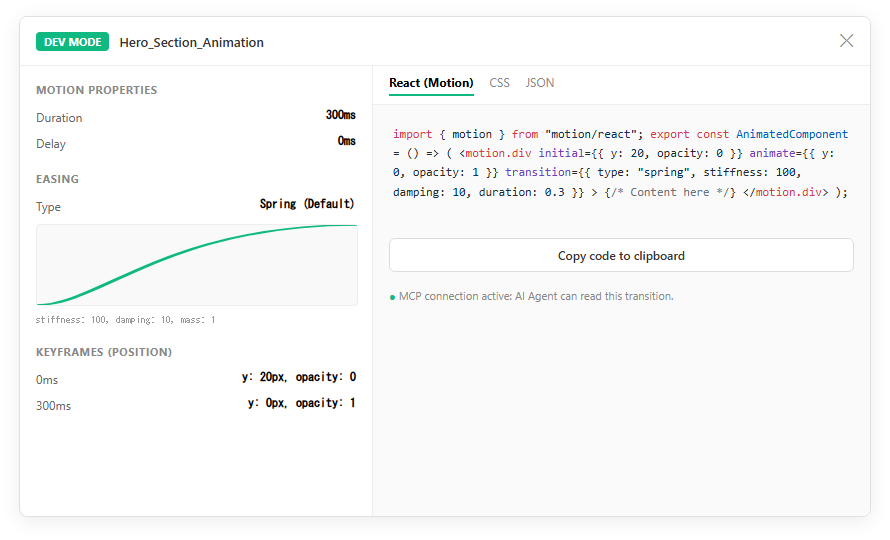
Furthermore, this feature supports the latest protocol, MCP (Model Context Protocol). This also made it possible to directly pass animation information on Figma to the coding AI agent, enabling automatic generation of implementation code. By automating the “translation work” involved in the transition from design to code, we simultaneously achieve shorter development periods and improved implementation accuracy.
Market Trends and Strategic Background
The Market Paradox Woven by Accelerated Earnings and Stock Price Crashes
The release of Figma Motion came at a highly unusual time when the business situation of the company Figma was extremely unusual. The company’s stock price, which went public (IPO) on July 31, 2025 (NYSE: FIG), hit a high of $142.92 immediately after listing, but by June 2026, it had dropped to about $18.64, marking a record drop of about 87% to 90% from its peak. Behind this is the persistent market concern (fear of AI disruption) that AI might fully automate design work and eliminate existing tools.
However, in contrast to the stock price movements, Figma’s business performance continues to show strong growth and acceleration. Sales for the first quarter of fiscal year 2026 reached $333.4 million, marking a 46% increase compared to the same period last year. This indicates that quarterly growth rates of 38% and 40% have accelerated further, and net dollar retention (retention and expansion of existing customers) remains at a very high level of 139%.
The number of paying customers has reached approximately 690,000, and non-GAAP operating profit has also been secured in the black. Contrary to the market’s scenario of “AI-driven decline,” the dependence of on-site product development teams on Figma has actually increased, and Figma Motion is expected to serve as a tool to further expand this solid customer base and enter the approximately $25 billion market (TAM) dominated by companies like After Effects.
Comparison with Adobe After Effects and Competitive Advantages
With the arrival of Figma Motion, Figma has directly entered the realm of motion design, which Adobe After Effects has long monopolized. However, Figma’s strategy is not to completely replace After Effects, but to differentiate itself through “workflow integration” in product design.
After Effects excels at advanced VFX and rich, cinematic visuals, but when delivering UI animations to implementation, they had to convert to formats like Lottie, causing complex handoffs with engineers. Figma Motion defines animations in the same place as design components and outputs them directly as CSS or React code, reducing the cost of this “handoff” to nearly zero.
In communities of professional motion designers (such as Reddit), Figma Motion is best suited for “micro-interactions” for web and apps, while After Effects still favors complex 3D rigs or particle representations. Figma aims to build an overall workflow advantage over Adobe’s suite of individual apps by consolidating the entire workflow of product development—design, animation, and code implementation—into a single canvas.
Future Outlook and Challenges to Be Addressed
Platform Strategy in the AI Era and the Defense of the “System of Record”
Figma’s vision for the future is not just about providing drawing tools, but about establishing itself as a platform (System of Record: the official record system) that connects every stage of product development. In recent years, the emergence of AI tools that automatically generate UIs with a single prompt has raised concerns about the commoditization of design tools. In response, Figma has successively introduced AI code generation features like “Figma Make” and web publishing features like “Figma Sites” in addition to Motion.
Figma’s strength lies in hosting the entire organizational development process, including design systems, version control, multi-person simultaneous editing, and smooth code integration during development, rather than one-off design generation. With Motion joining this ecosystem, animation can now be managed as part of the design system, further strengthening the foundation that supports design consistency and development speed across the team.
The easier it becomes for AI to create individual parts, the greater the value of platforms that integrate them and continue operating them with integrity. Figma Motion is not something to be replaced by AI, but rather a crucial stepping stone to remain the “center” for integrating and controlling AI-generated fragmented designs as products.
Manifestation of Legal Risks and Future Highlights
Figma is evolving rapidly, but the risks associated with its growth are also becoming apparent. On December 5, 2025, Figma was sued in federal court for unauthorized use of users’ design data and sensitive information to train AI models. The plaintiffs argue that users have unknowingly opted into AI training programs, constituting intellectual property infringement and breach of contract.
This lawsuit symbolizes the industry-wide challenge Figma faces in developing and enhancing generative AI features: how to optimize data transparency and consent processes. Figma denies that the data is used in a format that does not identify specific individuals, but the outcome of the upcoming lawsuit could significantly impact the company’s AI strategy and brand credibility.
Future developments include support for exporting to Lottie format in Figma Motion (as clearly stated in the roadmap) and opening the 3D transforms feature to all users. Moreover, the key to the stock price recovery lies not in the new features themselves but on whether Figma can overcome the turbulent waves of AI-driven design automation and redefine the market as an essential infrastructure for the development process.
[#Figma #FigmaMotion #デザインツール #AI #UIUX #フロントエンド開発 #Config2026 #ITニュース]

コメント