Google has started rolling out the “AI Inbox” feature to paid Google Workspace users. This move aims to boost operational efficiency by automatically extracting and organizing important tasks and updates from routine emails.
- 1.1 Feature Expansion and Provision System for Paid Workspace Users
- 1.2 Two Key Features Transforming the Inbox
- 2.1 Prerequisites for Operation and Limitations of Analysis Targets
- 2.2 Operational Policy for Configuration Switching and User Management
- 3.1 Privacy Concerns and Security Challenges Associated with AI Analysis
- 3.2 Future Outlook and Key Points for Enterprises
1.1 Feature Expansion and Provision System for Paid Workspace Users
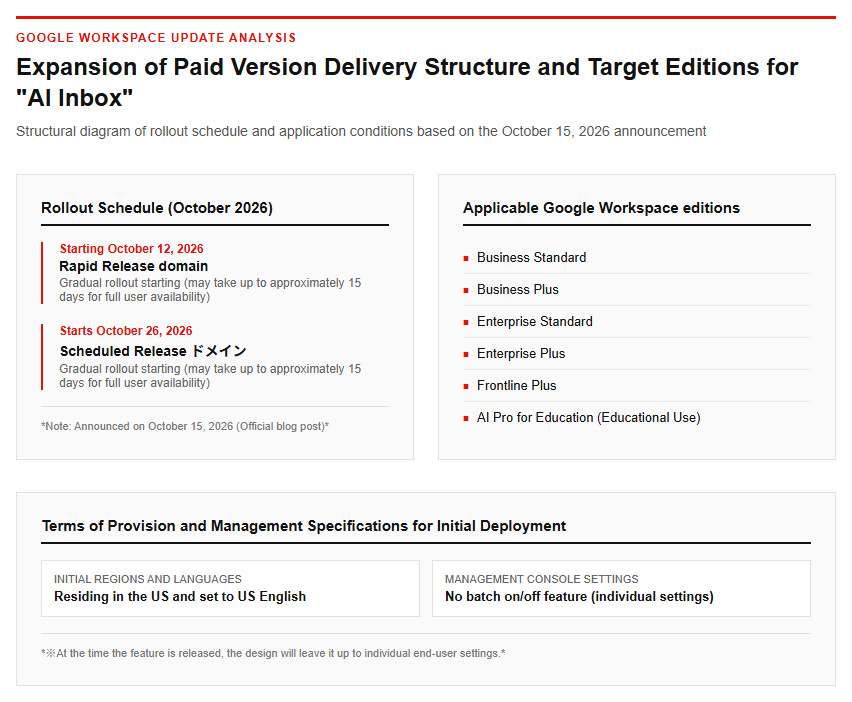
On October 15, 2026, Google announced in an official blog post that “AI Inbox,” an AI feature for Gmail previously available exclusively in paid consumer plans, will be rolled out to paid Google Workspace users for businesses and education. The eligible editions are Business Standard, Business Plus, Enterprise Standard, Enterprise Plus, Frontline Plus, and AI Pro for Education. This feature expansion aims to reduce the time spent processing the massive volume of emails delivered daily in routine operations, thereby helping users focus on critical tasks.
The service is being rolled out in phases, with the rollout beginning sequentially for Rapid Release domains on October 12, 2026, and for Scheduled Release domains on October 26, 2026. It takes up to approximately 15 days for the feature to reach all users within each domain. Additionally, at the time of launch, availability is limited to users residing in the United States whose account language setting is set to English (US). Notably, there is no administrator control to enable or disable the feature globally via the Admin console, leaving it up to individual end-user settings. Please refer to the figure below.
1.2 Two Key Features Transforming the Inbox
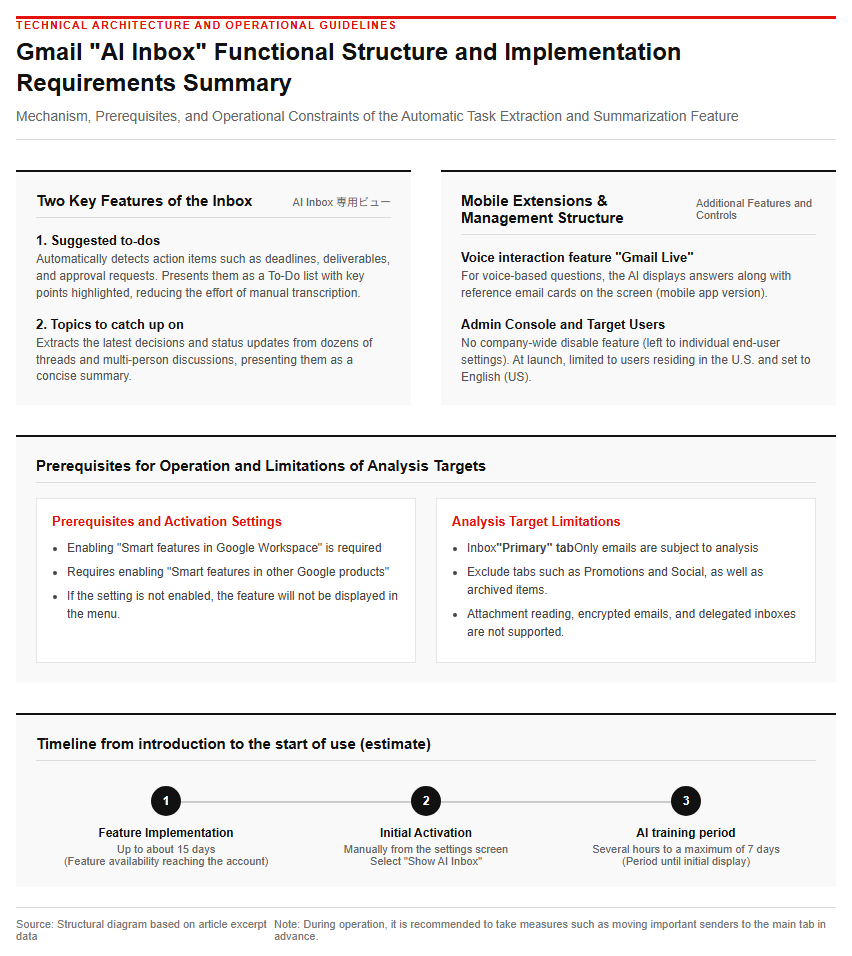
AI Inbox does not replace the traditional chronological inbox, but rather is added as a separate, dedicated view within the left-hand menu of Gmail’s web and mobile apps. Its primary components are two: “Suggested to-dos” and “Topics to catch up on.” The former, “Suggested to-dos,” automatically detects action items buried within email conversations—such as deadlines, deliverables, and approval requests—and presents them as a To-Do list with key details highlighted. This eliminates the need for users to manually copy these tasks over to a task management tool.
The latter, “Topics to catch up on,” is a feature that extracts the latest decisions and status changes from dozens of threads or multi-person project discussions, summarizing them concisely. In addition, coinciding with this rollout, a voice interaction feature called “Gmail Live” has been added to the mobile Gmail app. When users ask by voice, such as “When is the deadline for the next training?” or “What is the order status from a specific customer?”, the AI responds via voice while displaying reference cards of the underlying emails on the screen.
2. Implementation Requirements and Practical Operational Rules
2.1 Prerequisites for Operation and Limitations of Analysis Targets
For AI Inbox to function properly, you need to enable both “Smart features in Google Workspace” and “Smart features in other Google products” in your Gmail settings. If these personalization settings are disabled, the AI Inbox feature will not appear in the menu. In addition, there are certain limitations regarding the data that the AI automatically analyzes. Analysis is performed only on emails classified under the “Primary” tab of the inbox, and messages in sub-tabs such as “Promotions” or “Social,” or those that have been manually archived, deleted, or muted, are excluded from the analysis.
Furthermore, it does not currently support reading text within attachments, encrypted emails, or delegated inboxes. When the feature is first enabled, the AI learns from past communication trends and context, so it may take anywhere from a few hours to up to about 7 days for the initial To-Dos or topics to appear on the screen. Additionally, since communications from important clients might be automatically sorted into tabs other than the primary one and run the risk of being missed during task extraction, operational workarounds such as moving important senders to the primary tab in advance are required.
2.2 Operational Policy for Configuration Switching and User Management
AI Inbox does not offer a centralized management option for administrators to disable it organization-wide. Therefore, IT departments and administrators at adopting companies must proceed with user education and the creation of usage guidelines. To toggle this feature on an individual device, select “See all settings” from the gear icon in the upper-right corner of the Gmail web interface, and configure the display settings using the “Show AI Inbox” checkbox under the “Inbox” tab. Please refer to the figure below.
In practical operations, establishing a feedback loop to improve the accuracy of AI-generated tasks is crucial. By clearing presented to-dos using “Mark done” or removing inappropriate items using “Remove to-do,” users can help correct and refine the AI’s extraction accuracy. It is strongly recommended to strictly enforce operational rules requiring that users do not blindly trust generated figures such as deadlines and amounts, but instead always check the original email body—which is accessible with a single tap—before responding to external parties.
3. Security Discussions and Future Outlook
3.1 Privacy Concerns and Security Challenges Associated with AI Analysis
Regarding the automated analysis of emails and the use of AI, there are diverse discussions from both privacy and security perspectives. In the latter half of 2025, concerns spread across social media and other platforms regarding the fact that personalization settings for smart features were enabled by default, with users asking, “Are the bodies of our emails being used without permission for Gemini’s AI training?” Although Google officially denied this, stating that “smart features have been offered for years and Gmail content is not used to train Gemini models,” users’ scrutiny regarding the transparency of data collection is becoming increasingly severe, as evidenced by a class-action lawsuit filed in the United States under the California Invasion of Privacy Act.
Furthermore, recent academic research (such as AudAgent) has pointed out that when LLM-based AI agents integrate with third-party tools and external APIs, there is a risk of unintended data disclosure and the leakage of confidential information (such as social security numbers and personal contact details). While the convenience of AI automatically processing email contexts continues to grow, it has become essential for enterprises to reassess access privileges and governance regarding the extent of data that should be entrusted to AI processing.
3.2 Future Outlook and Key Points for Enterprises
Google plans to expand the availability of AI Inbox over the coming months to other editions, such as Business Starter, Enterprise Starter, and AI Pro for Education. Additionally, because it is currently limited to the US and English (US) environments, the timing of its rollout to regional markets including Japan, as well as the accuracy of its support for Japanese business contexts and honorific expressions, will be major points of interest going forward.
In the “Gemini Agent” vision promoted by Google Cloud, the execution of autonomous tasks in a secure environment is presented through security infrastructure such as Agent Sandboxes with isolated network boundaries and Agent Gateway for policy control. With AI deeply integrated into the everyday communication infrastructure of email, it is expected that seamless business automation will accelerate—ranging far beyond simple email organization to calendar scheduling, document creation, and internal system integration. Companies are required to ensure the alignment of data protection and internal policies while enjoying these conveniences.
Reference Page
【#Gmail #AIInbox #GoogleWorkspace #Gemini #ProductivityBoost #PrivacyRisks】


コメント