
On June 30, 2026, Anthropic launched the beta version of its official desktop app “Claude Desktop” for Linux users. The underlying goal is to eliminate the reliance on browsers and unofficial tools in Linux, which is the main environment for many professional developers, and to provide a safer and more advanced development experience.
- Official Beta Release in June 2026
- Implementation Process and Package Mechanism
- Three main interfaces included
- Full utilization of local resources through MCP
- Feature Limitations and Requirements in Beta Versions
- Signaling and Building Trust in the Developer Community
- Expansion of AI infrastructure and expectations for next-generation models
Official Beta Release in June 2026
On June 30, 2026, Anthropic finally released the beta version of its official desktop app for Linux users. Until now, many professional developers have used Linux environments without official desktop clients, forcing users to rely on web interfaces or make use of unofficial community packages ported to Windows. With this release, secure packages signed by official vendors will be officially available on Ubuntu 22.04 and later and Debian 12 and later.
The main supported specifications are as follows:
-
Supported OS: Ubuntu 22.04 or later, Debian 12 or later
-
CPU architecture: x86_64, arm64
-
Distribution Method: Official APT repository and .deb package
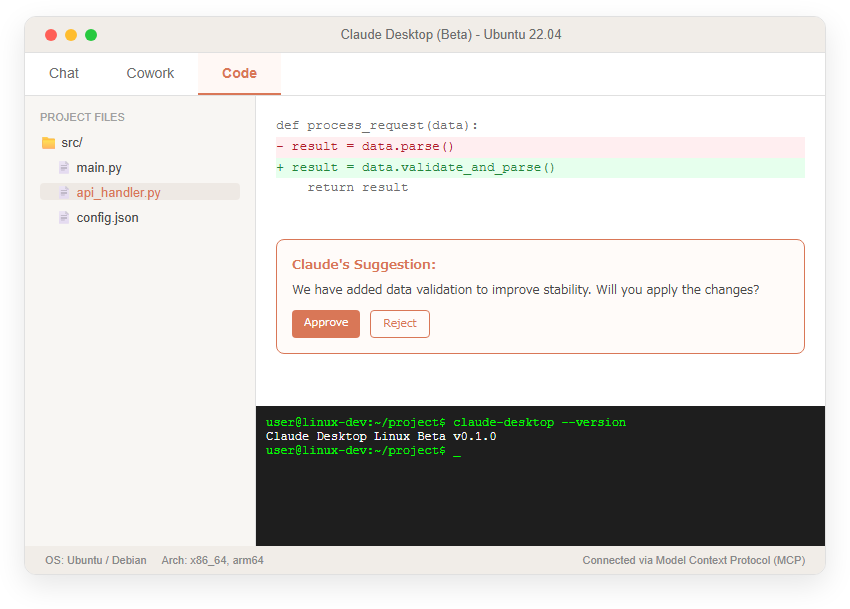
Architecturally, it supports both x86_64 and ARM64, and is expected to operate on a wide range of devices from modern hardware to single-board computers. The launch of the official app means more than just adding to the platform, elevating the reliability and convenience of AI tools that developers use daily. The diagram below shows an image of Claude Desktop operating in a Linux desktop environment.
Implementation Process and Package Mechanism
The implementation process mainly involves providing it via the “apt repository,” which adheres to Linux standard practices. By adding Anthropic’s own official repository to the system and importing the public key, you can automatically receive app updates as part of the OS’s standard package management process, “sudo apt update & sudo apt upgrade.” This is a highly rational and reliable mechanism in the Linux software ecosystem, which often does not include dedicated editors.
Additionally, as an alternative, individual “. The “deb package” can also be downloaded from the official website, but if installed this way, the repository will not be automatically added, so future security patches and new feature updates will not be automatically received, which is a limitation. For security-conscious engineers, officially providing signed packages from trusted sources is an essential requirement for implementing AI tools that grant broad access to local files.
Three main interfaces included
The Linux version of the app features a rich interface comparable to the earlier macOS and Windows versions, consisting of three separate tabs: “Chat,” “Cowork,” and “Code.” The Chat tab offers an intuitive interactive interface similar to the traditional browser version, while the Cowork tab is specialized for collaborative work across multiple documents and files.
Among them, the Code tab is especially noteworthy, where the following advanced operations are available:
-
Direct referencing and editing of local project files
-
Managing multiple coding sessions simultaneously
-
Display and approval of differences (diff) for AI-proposed code changes
-
Using the integrated terminal and editor
This feature, which allows developers to work seamlessly without frequently switching terminals or IDEs, evolves AI from merely an “advisor” into a “practical partner” who co-writes the actual source code together.
Chapter 2: Integration Features and Constraints to Maximize Development Efficiency
Full utilization of local resources through MCP
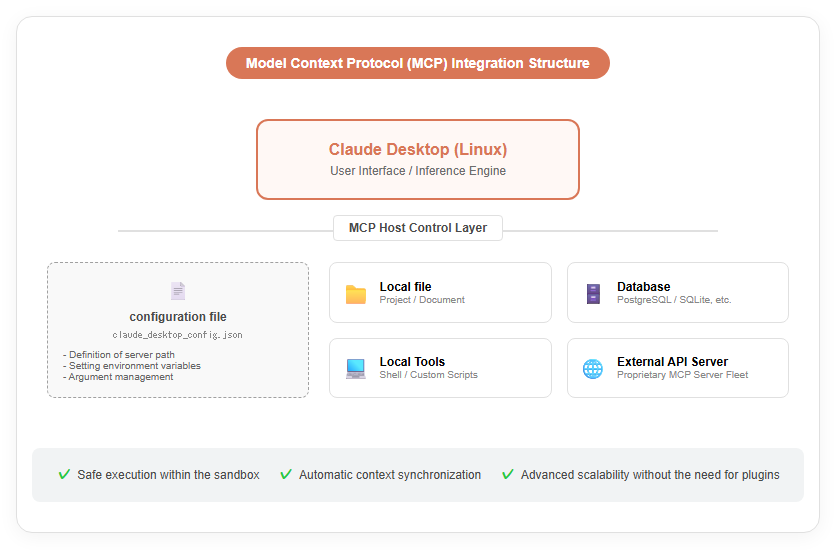
One of the biggest technical advantages of providing official desktop apps is their native support for the Model Context Protocol (MCP). By using MCP, Claude is not isolated in the sandbox of browsers, but can now work directly and securely with local files, databases, APIs, and even specific development software on users’ computers.
This enables AI models to accurately grasp the overall structure of the project they are currently working on and the contextual unique to their local environment, automatically ingesting information that could only be manually copied and pasted in browser versions, and generating suggestions based on deep insights. For developers, the ability to centrally manage MCP server settings in human-readable JSON-format files (claude_desktop_config.json) and expand their proprietary tools with just a few lines of writing is an extremely powerful tool for driving business automation. The following diagram shows how Claude collaborates with local resources through MCP.
Feature Limitations and Requirements in Beta Versions
While convenience has greatly improved, it is important to note that this release is positioned as a “beta” and currently has some advanced features restricted.
The main restrictions and unaddressed items are as follows:
-
Computer Use (screen controls): currently disabled on Linux versions
-
Voice input (dictation): Not included in the app UI (only available on the CLI version)
-
Quick Launch Shortcut: Requires individual settings in Wayland environments
-
Unsupported OS: Fedora, RHEL, etc. are currently under testing
Features like Claude, which is well-known in macOS and elsewhere, interpret screen content in real time and operate applications on behalf of the user will need to wait for future updates. Additionally, to use the advanced Code tab, you may need a paid subscription to either the Pro, Max, Team, or Enterprise plans, which is an important point when considering implementation.
Chapter 3: Future Outlook and Industry Impact
Signaling and Building Trust in the Developer Community
The launch of the Linux version signifies that Anthropic has sent a strong signal to the global developer community that “you are high-priority users.” According to Stack Overflow’s 2025 survey, about 27.7% of professional developers use Ubuntu as their primary OS, and for those who had previously relied on unofficial tools, the arrival of official packages was long-awaited news.
Just as the request to release the Linux version immediately gathered over 500 upvotes on Hacker News, the earnest voices from engineers have now been officially reflected in the product roadmap. Going forward, the criteria for choosing AI tools will shift beyond mere computational performance to the quality of user experience, such as “how deeply the user understands and respects your development workflow.” Through the official app, a future where AI and human engineers collaborate more closely and securely is becoming a reality.
Expansion of AI infrastructure and expectations for next-generation models
This release is deeply connected to Anthropic’s massive infrastructure strategy behind it. Through its partnership with Amazon, the company has secured up to $33 billion in investment and secures an astonishing computing capacity of up to 5GW on AWS. Building on this robust infrastructure, the latest model called “Claude Sonnet 5” will be released on June 30, 2026, offering more advanced inference and agent capabilities than ever before.
The Linux desktop app serves as a “vessel” for developers to run these cutting-edge AI models most efficiently. Going forward, further integration with AWS Bedrock is expected to enable enterprise-wide AI utilization while maintaining corporate security policies, and further acceleration of response times through optimization of our proprietary AI chip “Trainium3.” With the flexible Linux platform, Claude will continue to evolve beyond a simple chatbot into the next-generation intelligent operating layer that connects the cloud and local environments.

」を開設_en.png)
コメント