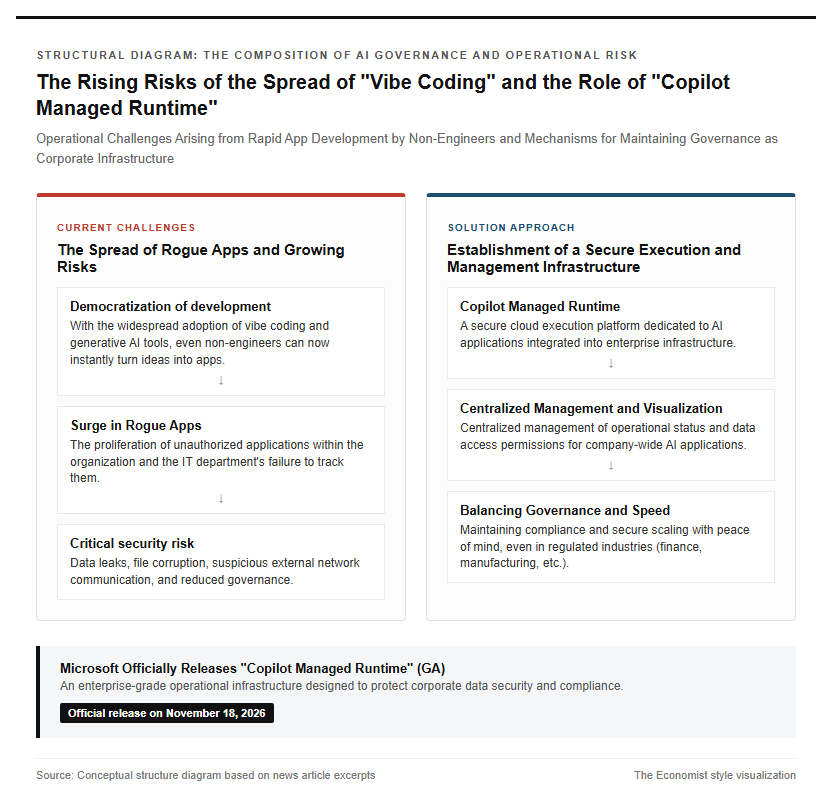
On November 18, 2026, Microsoft officially released (Generally Available, or GA) the “Copilot Managed Runtime,” a cloud platform designed to securely run and manage AI-generated applications within enterprises. This comes against the backdrop of the rapid proliferation of shadow apps driven by the swift adoption of vibe coding and generative AI tools, along with serious concerns within organizations over data leaks and declining IT governance.
- The Democratization of AI App Development and the Operational Risks Faced by Enterprises
- Major updates in the Generally Available (GA) version announced at Ignite 2026
- Secure Execution Environment Within the Microsoft 365 Tenant Boundary
- Security Control through Entra ID Authentication and Dynamic Policy Application
- Centralized app inventory management in the Microsoft 365 Admin Center
- Governance Features for Isolated Sandboxes and Data Connectors
- Git-native Development Cycle and the Mechanics of the Inner Loop
- Integration with Copilot Studio and third-party tools
- Advanced ALM Practices Utilizing Local Development Environments and CLI
- Market Competition in the Cloud Infrastructure and Application Layers
- Return on Investment (ROI) and Operational Cost Management in Token Ecosystems
- Implementation Challenges and Evaluation Metrics in Major Industries Such as Finance and Manufacturing
- Building Corporate Internal Governance and Phased Deployment Procedures
- Shadow IT Countermeasures and Operational Automation in the Generative AI Era
- Next-generation business infrastructure where AI agents and humans collaborate
The Democratization of AI App Development and the Operational Risks Faced by Enterprises
As of 2026, with the evolution of generative AI and vibe coding technologies, an environment has been established where even non-engineer frontline employees can instantly turn ideas into applications. While tools such as Copilot Code and Copilot Cowork have dramatically lowered the barriers to development, unauthorized rogue applications are surging within organizations. As a result, security vulnerabilities such as inappropriate data access, file corruption, and suspicious communication with external networks have emerged as serious risks. Particularly in strictly regulated industries like finance and manufacturing, there has been a strong demand for methods to maintain IT governance and compliance without compromising the speed of development. Expectations are growing for it to serve as an operational foundation to address these rogue application issues and safely scale company-wide AI utilization. Please refer to the conceptual deployment structure diagram below.
Major updates in the Generally Available (GA) version announced at Ignite 2026
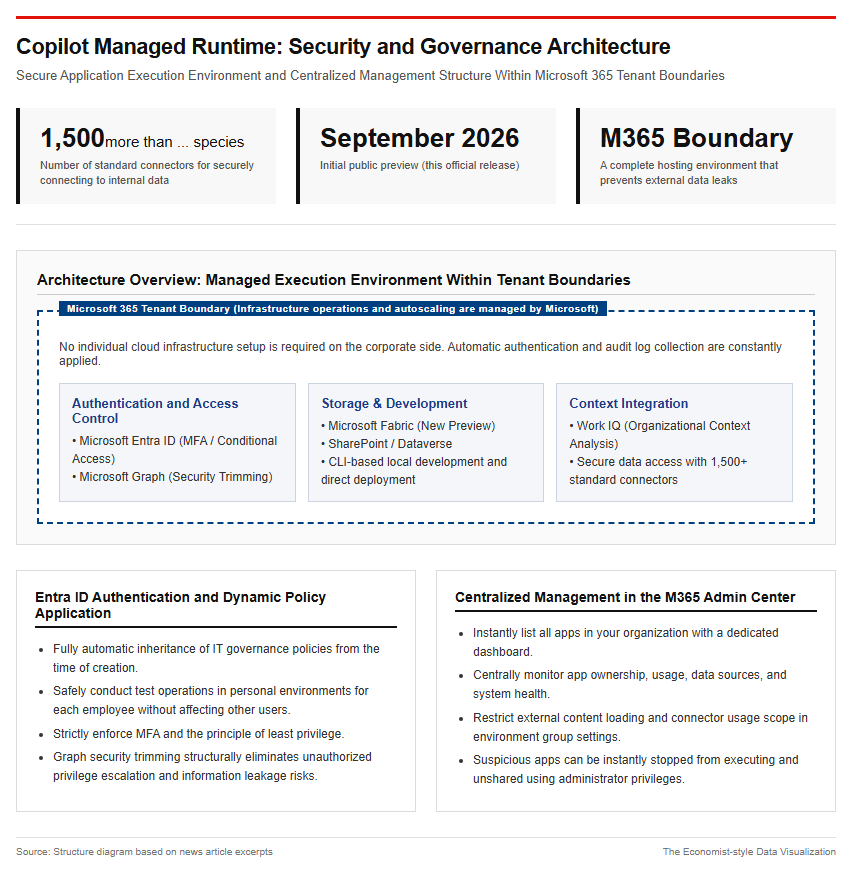
At “Microsoft Ignite 2026,” held in the early hours of November 18, 2026, Japan time, Microsoft announced the General Availability (GA) of the Copilot Managed Runtime and its sequential rollout to each tenant. Since its initial debut as a public preview in September 2026, the service has undergone feature enhancements incorporating feedback from enterprises. Coinciding with this official release, an application-dedicated persistent storage feature integrated with Microsoft Fabric has been added as a preview, providing a new data storage option following SharePoint and Dataverse. Furthermore, advanced developer features have been newly introduced, allowing developers to directly develop and edit Copilot Studio agents and workflows in a local environment using a CLI (command-line interface) and deploy them directly to the cloud.
Secure Execution Environment Within the Microsoft 365 Tenant Boundary
The greatest technical strength of the Copilot Managed Runtime lies in its ability to completely host and execute applications within the Microsoft 365 tenant boundary deployed by an enterprise. Since it is a fully managed service where Microsoft handles infrastructure provisioning, auto-scaling, and maintaining availability, enterprises do not need to set up or operate separate cloud infrastructure. Application execution requires authentication via Microsoft Entra ID, automatically applying the organization’s conditional access policies and audit logging. Additionally, by integrating with over 1,500 standard connectors, Microsoft Graph, and Work IQ—which analyzes organizational context—it establishes an environment for securely accessing internal data while preventing information leakage.
Architectural Structure Ensuring Governance and Safety
Security Control through Entra ID Authentication and Dynamic Policy Application
All applications running on this runtime are designed to automatically inherit the organization’s IT governance policies from the exact moment they are created. When an employee begins development, a uniquely identified personal environment is automatically created, enabling safe test operations without impacting the production environment or other users. During user sign-in, multi-factor authentication (MFA) via Microsoft Entra ID and the principle of least privilege are strictly enforced, while access to data for which the user lacks permissions is blocked by Microsoft Graph’s security trimming feature. This structurally eliminates the risk of AI applications using improperly elevated privileges to leak confidential information externally.
Centralized app inventory management in the Microsoft 365 Admin Center
IT administrators can instantly list and understand all applications created and published within their organization from a dedicated dashboard in the “Microsoft 365 Admin Center.” Unlike traditional setups where management screens are scattered across different development tools, administrators can centrally monitor app owners, usage status, connected data sources, and system health. By customizing the default settings for environment groups, administrators can flexibly restrict the loading of external content, the scope of connector usage, and app sharing ranges. If an app showing suspicious behavior is discovered, they are empowered with strong control capabilities to immediately stop execution or revoke sharing with administrator privileges. Please refer to the following management screen configuration example.
Governance Features for Isolated Sandboxes and Data Connectors
To improve the safety of AI applications, sandbox technology—which isolates applications from system resources and the file system—is essential. In Copilot Managed Runtime, programs are processed within strictly isolated execution environments (sandboxes). Therefore, even if vulnerabilities or bugs exist within a program, they will not compromise the existing core systems. Furthermore, in data integration, to prevent unnecessary data leakage outside the organization, detailed data impact scopes can be defined for over 1,500 types of connectors. Processing by AI agents is limited to monitorable pipelines, allowing business processes to be executed with full guarantees of traceability and auditability.
Achieving Flexibility in Development Workflows and Multi-Tool Integration
Git-native Development Cycle and the Mechanics of the Inner Loop
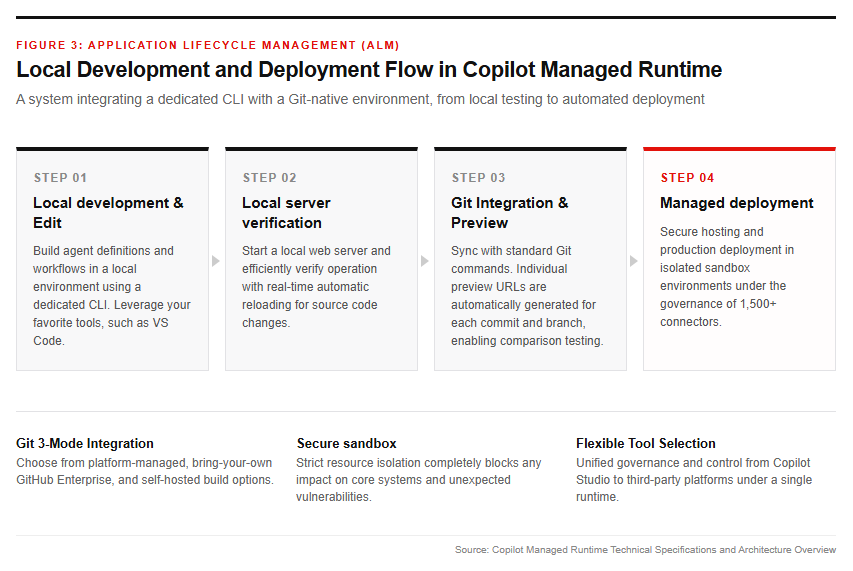
Copilot Managed Runtime adopts a “Git-native” inner-loop structure with full compatibility with existing Git tools. Developers can perform code management directly using familiar standard commands like git add, git commit, and git push. For repository configuration, users can choose from three modes: platform-managed Git, bringing your own GitHub instance integrated with GitHub Enterprise Cloud, and bringing your own self-built setup. Individual preview URLs are automatically generated for each commit and branch, enabling developers to smoothly verify operations in a browser and conduct comparison tests between old and new versions prior to production release.
Integration with Copilot Studio and third-party tools
Application development methods range from writing code using programming languages to building nodes through natural dialogue. While business users can create apps conversationally via Copilot Cowork and Copilot Code, professional developers can leverage VS Code, GitHub Copilot, and even third-party development platforms such as Lovable and Manus. Regardless of which tool is used to build the app, it is ultimately hosted and governed uniformly on the same Copilot Managed Runtime. This prevents shadow IT while guaranteeing each department the right to choose the optimal tool for its needs.
Advanced ALM Practices Utilizing Local Development Environments and CLI
This runtime enables efficient local app development and advanced application lifecycle management (ALM) by using a dedicated CLI. Developers can run dedicated commands on their local machines to start a local web server and proceed with development while automatically reloading source code changes in real time. Leading companies such as Qualcomm leverage this CLI to locally edit Copilot Studio agent definitions and workflows, achieving continuous deployment linked with version control systems. Please refer to the local development flow below.
Market Environment and Evaluation Surrounding Enterprise AI Execution Infrastructure
Market Competition in the Cloud Infrastructure and Application Layers
In the enterprise AI market, a fierce battle for runtime execution platforms is intensifying between major platform providers—led by Microsoft—and dedicated AI companies. According to research data as of 2026, the paid usage share of Copilot is undergoing a period of adjustment, and a multi-AI strategy is spreading in which users select the optimal AI infrastructure based on functionality and customizability. In particular, in response to the rise of agent-dedicated runtimes such as Anthropic’s “Claude Managed Agents,” Microsoft is rushing to expand its Copilot Managed Runtime by leveraging its strong Microsoft 365 customer base and controlled governance environment.
Return on Investment (ROI) and Operational Cost Management in Token Ecosystems
Corporate AI investment evaluation is shifting from traditional model development scale to an emphasis on “unit economics (ROI),” which demonstrates the ratio of actual business value to inference costs. With the proliferation of Agentic AI leading to an explosive increase in token consumption, it has become essential for companies to establish “AI FinOps,” encompassing token unit prices, API call frequencies, and infrastructure costs. Copilot Managed Runtime adopts a consumption-based and subscription-based billing model grounded in Copilot Credits and Power Apps Premium licenses. This enables IT administrators to set per-user usage limits (Spending Policies) to prevent unlimited token consumption and budget overruns.
Implementation Challenges and Evaluation Metrics in Major Industries Such as Finance and Manufacturing
The adoption status of AI technology varies significantly across industries. In the internet and financial industries, where data digitization is progressing, the introduction of high-precision inference agents and high ROI are beginning to be demonstrated. On the other hand, in the manufacturing and energy sectors, complex industrial data structures and strict on-site risk control standards exist, leading to high trial-and-error costs and continued cautious pilot projects. When enterprises introduce this runtime, a multidimensional preliminary evaluation based on four indicators—business suitability, data readiness, technical feasibility, and the ROI creation cycle—holds the key to success.
Implementation Roadmap Toward Practical Application and Future Outlook
Building Corporate Internal Governance and Phased Deployment Procedures
When enterprises adopt Copilot Managed Runtime, a phased approach is recommended rather than a simultaneous company-wide rollout. As a first phase, administrator roles are assigned in the Microsoft 365 Admin Center, and policy settings for the default environment group (such as connector restrictions and sharing restrictions) are reviewed and customized. Next, a specific pilot department is selected to create apps in personal environments and conduct preview verification. Once effectiveness and safety in actual operations are confirmed, the process transitions to company-wide sharing, establishing an operational cycle that continuously executes monitoring and cost control using management features.
Shadow IT Countermeasures and Operational Automation in the Generative AI Era
The full-scale adoption of this runtime serves as a fundamental solution to the “shadow IT problem” that has plagued enterprises for years. Instead of business improvement apps voluntarily created by general employees becoming hidden rogue apps, they are automatically registered in the IT department’s inventory immediately upon creation and placed under security monitoring. Furthermore, with AI-driven error detection and automated access permission checks (security trimming) operating in real time, a secure citizen development environment can be expanded without significantly increasing the operational burden on the IT department.
Next-generation business infrastructure where AI agents and humans collaborate
Moving forward, we are transitioning from simple question-and-answer chat AIs to an era where humans work in coordination with “AI agents” that autonomously execute multi-step tasks. With the advent of the autonomous agent “Autopilot” and the shared collaborative space “Copilot Workspaces” announced at Ignite 2026, AI is evolving from a mere supplementary tool into a co-owner of business processes. Copilot Managed Runtime is expected to serve as a unified foundation layer for these diverse AI agents and apps to operate securely, powerfully driving corporate digital transformation (DX) and productivity reform.
Reference Page
- 【Copilot Managed Runtime is now generally available, with additional new preview features】https://techcommunity.microsoft.com/blog/copilot-managed-runtime-blog/copilot-managed-runtime-is-now-generally-available-with-additional-new-preview-f/4571846
- 【Build, preview, and deploy Microsoft Copilot Managed Runtime apps (Preview)】https://learn.microsoft.com/en-us/microsoft-365/copilot-managed-runtime/developer/apps/dev-inner-loop?view=o365-worldwide
- Microsoft Copilot Managed Runtime overview for admins
【#CopilotManagedRuntime #Microsoft #GenerativeAI #ITGovernance #AIAgents #Microsoft365】


コメント