The 3D visualization software “KeyShot Studio 2026.3” was officially released on November 12, 2026. Through the integration of an AI Agent capable of configuring rendering settings via text instructions and dedicated cloud storage, workflows from product design to market launch are undergoing transformation.
- Background of the 2026.3 Release and Product Evolution
- AI Agent that Automates Scene Construction Using Natural Language
- Cloud Storage to Boost Team Collaboration
- Part Variations and Studio Groups for Centralized Management of Shape Variations
- Support for the Latest CAD Formats and Importer Improvements
- Enterprise SSO/MFA Support and License Configuration
- 100-Credit Promotion Campaign and Future Product Outlook
Background of the 2026.3 Release and Product Evolution
On November 12, 2026 (local time), the latest version of the major 3D rendering software KeyShot Studio, “KeyShot Studio 2026.3,” was released. It has earned high acclaim in manufacturing, apparel, and product design fields as software that allows users without specialized CG knowledge to intuitively generate photorealistic visuals. The company behind KeyShot champions the SaaS category of “Product Design-to-Market,” aiming to eliminate inefficiencies caused by interdepartmental data silos and redundant tasks. While previously, importing models, setting textures, and adjusting lighting required a massive number of clicks and specialized manual work, this update significantly enhances AI-driven automation and cloud-based collaboration foundations. Please refer to the figure below.
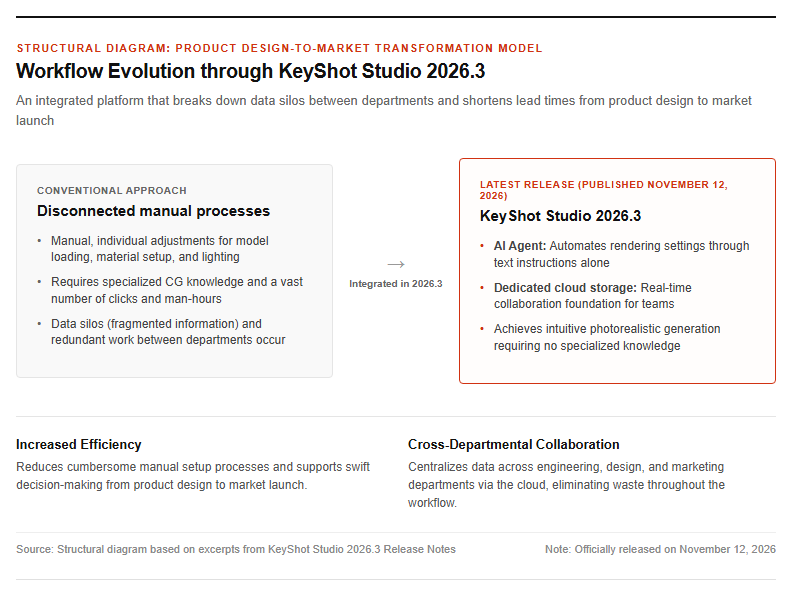
This product evolution is expected to shorten the timeframe from product development to marketing channel deployment.
AI Agent that Automates Scene Construction Using Natural Language
As the marquee feature introduced in KeyShot Studio 2026.3, an interactive “AI Agent” has been included as a beta version. By simply typing the desired image into the toolbar’s chat screen using everyday language, the AI performs complex tasks on behalf of the user, such as material settings, lighting adjustments, camera placement, and environment configurations. It even handles the application of library assets and final rendering output settings, which previously required advanced expertise, freeing designers from repetitive setup tasks. This AI Agent runs in the cloud and operates on a system that consumes KeyShot Credits depending on the processing required. Furthermore, unlike “AI Shots”—a feature for image expansion in local environments—the flag for silent installation has been updated to “/NO_AI,” enabling centralized control of both features. Through automation, creators can now focus their time on trial and error as well as the design process itself.
Cloud Storage to Boost Team Collaboration
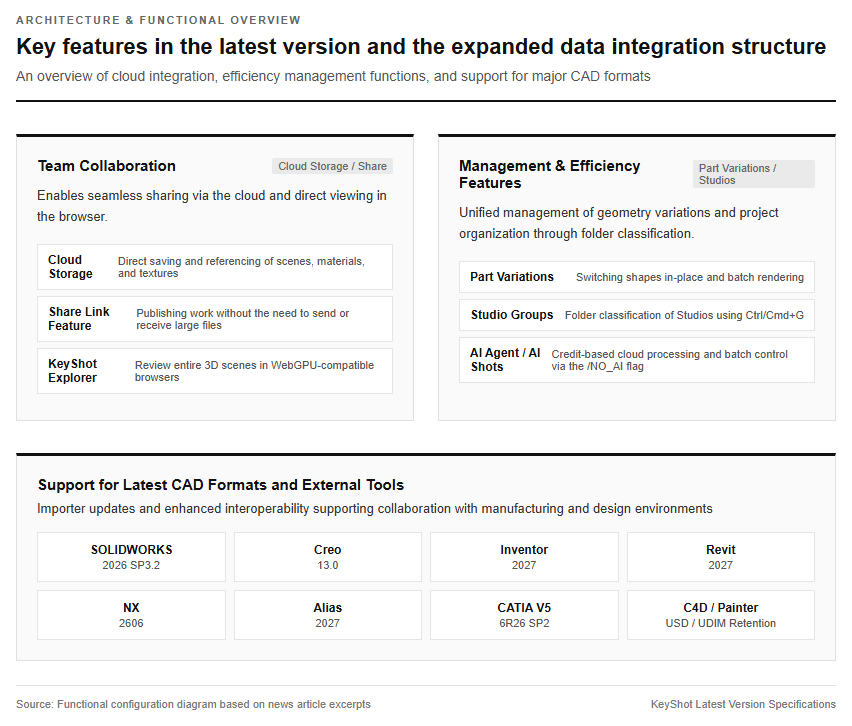
This version newly integrates an unified “Cloud Storage” for each user. This allows scene data, materials, textures, and rendering deliverables to be saved to and referenced in the cloud directly from within the software, enabling users to resume work seamlessly even when switching devices. In addition, by leveraging the new “Share” feature, users can now easily publish their work to third parties by issuing a share link. Viewers who receive the link can check the entire 3D scene directly in their browser via the beta feature “KeyShot Explorer,” which runs on WebGPU-compatible browsers, without needing to install the KeyShot Studio application itself. This eliminates the hassle of sending and receiving large scene files individually, enabling rapid feedback building and consistent data management both inside and outside the organization.
Management Functions and Data Integration to Enhance Work Efficiency
Part Variations and Studio Groups for Centralized Management of Shape Variations
“Part Variations” has been added as a feature to streamline the rollout of product variations. While conventional multi-material functions were strong at switching colors, managing differences in part shapes, sizes, and accessories required the complex construction of model sets. With Part Variations, users can select parts or groups and register variations, allowing shape switching at the same position to be managed locally within a single scene. Multiple models, such as saddle changes for city bikes and electric bicycles, can be consolidated into the same scene, and all patterns can be batch-rendered from the Render dialog queue. In addition, “Studio Groups” has been implemented, allowing the Studios function—which preserves combinations of cameras, environments, and model sets—to be organized into folders. Grouping can be performed using the Ctrl/Cmd+G shortcut operation, dramatically improving project management in large-scale projects.
Support for the Latest CAD Formats and Importer Improvements
Significant updates have also been rolled out for the suite of importers that support collaboration with manufacturing and design environments. They now support the latest CAD software formats, enabling direct reading of SOLIDWORKS 2026 SP3.2, Creo 13.0, Inventor 2027, Revit 2027, NX 2606, Alias 2027, and CATIA V5 (6R26 SP2). In addition, importing from Cinema 4D now features improved interoperability for instance geometry and OpenPBR materials, and the accuracy of retaining UDIMs and displacement maps in USD files exported from Substance 3D Painter has been enhanced. Faster convergence speeds for caustic rendering calculations and reduced startup times have also been achieved. Please refer to the figure below.
Note that LiveLinking support from SOLIDWORKS has been discontinued due to a business model change on the Dassault Systèmes side.
Enterprise Features, Pricing Structure, and Future Outlook
Enterprise SSO/MFA Support and License Configuration
To facilitate organizational adoption and strengthen security governance, KeyShot Studio Enterprise plans now integrate native SSO (Single Sign-On) and mandatory MFA (Multi-Factor Authentication) settings. This enables connection with corporate identity management systems for the automatic provisioning and de-provisioning of access rights upon employee onboarding and departure, meeting the stringent requirements of security and procurement departments. The product lineup consists of four editions: Professional, Business, Enterprise, and Education. As examples of annual subscription pricing, the Professional plan is offered at $1,299 per year (220,000 yen excluding tax in Japan), while the higher-tier Business plan is available at $1,599 per year (270,000 yen excluding tax in Japan). The Business plan includes integrated license deployment tools and the right to add network rendering add-ons, allowing for an optimal choice tailored to the operational scale.
100-Credit Promotion Campaign and Future Product Outlook
To commemorate the release of KeyShot Studio 2026.3, a limited-time update bonus is being offered. Users who update their eligible licenses to version 2026.3 between November 12 and December 12, 2026, will receive 100 KeyShot Credits (equivalent to $25) usable for AI Agents and cloud rendering. The granted credits will be valid for 30 days, providing a great opportunity to test new features at no additional cost. Looking ahead, processing performance is expected to be expanded on both hardware and cloud fronts, through the broader utilization of “Public Library,” a cloud-based asset sharing environment, and the implementation of Apple GPU hardware acceleration support on Macs. The advanced convergence of generative AI and 3D visualization is garnering attention as an important trend that will revolutionize product marketing.
Reference Pages
- 【Meet your new AI Agent, plus personal cloud storage, enterprise SSO and easier variations in KeyShot Studio 2026.3】https://www.keyshot.com/blog/keyshot-introduces-single-sign-on-ai-agent-and-more/
- 【Release Notes 2026.3 – KeyShot Studio Manual】https://manuals.keyshot.com/kss2026/en-us/manual/Release-Notes-2026.3.htm
【#KeyShot #KeyShotStudio #3DCG #3DRendering #GenerativeAI #CAD #DesignWorkflow #SaaS】

コメント